Category Linking
The Category Linking menu allows users to link the parent categories to various subcategories. The categories can only be linked to another category that is one step above or below it, as follows:
-
Main Category > Sub-category 1
-
Sub-category 1 > Sub-category 2
-
Sub-category 2 > Sub-category 3
-
Sub-category 3 > Sub-category 4
-
Sub-category 4 > Sub-category 5
Perform the following steps to link categories.
Navigate to Settings à Retail Setup à Category Linking.
Select a parent category from the Category grid.
Select the preferred sub-categories from the Sub-Category 1 grid, which must be linked to the main category.
Click Save.
Perform the following steps to link the sub-categories:
Select Retail Sub Category option.
Select a subcategory level from the drop-down list. The items of the selected sub category are displayed in the left-hand side grid, while the items of the sub category below the selected sub category are displayed on the right hand side grid.
Select an item from the left-hand side grid and then select the items that must fall under it from the right-hand side grid.
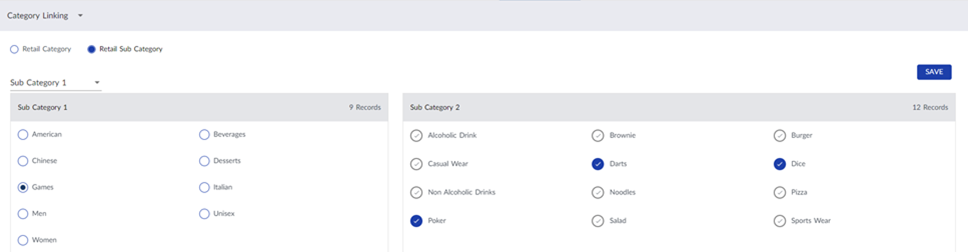
Click Save.