Creating Equipment Locations
The Maintain Equipment Locations option allows users to create records of locations where equipment maintenance and work orders happen at the property. When creating work orders under the Maintenance (Housekeeping à Maintenance) screen, the records created here are displayed as options in the Location drop-down list.
Breakpoint: 70045 - Maintenance Equipment/General Locations (Front Office - Housekeeping)
Perform the following steps to create a location record for equipment maintenance:
Navigate to Settings à Maintenance Setup à Maintenance Equipment Locations.
Click Create Maintenance Equipment Location. The Create Maintenance Equipment Location screen appears.
Refer to the following table and fill in the fields:
|
Field |
Description |
|---|---|
|
Location Code |
A unique code used to identify the public area of the property used for equipment maintenance. Up to 15 alphanumeric characters are supported. |
|
Location Name |
The name of the location that is used for equipment maintenance. Up to 50 alphanumeric characters are supported. |
|
List Order |
The position at which the record created for equipment location must appear in the grid. By default, the system automatically generates a value based on the value of the previously created list item. Values up to 999 are supported. |
|
Active |
When enabled, it indicates that the equipment location is active. |
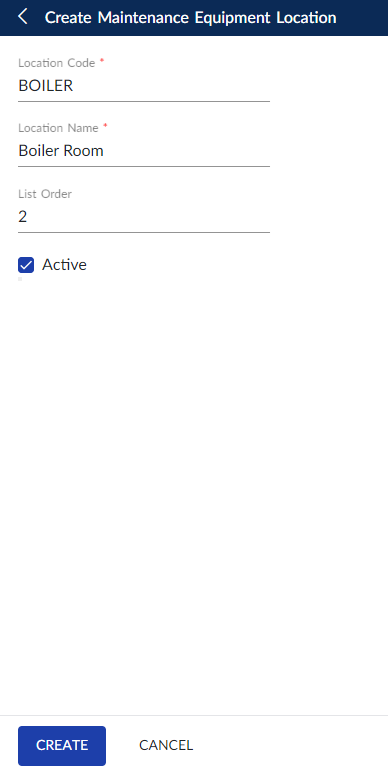
Click Create. The record for equipment location is created and displayed in the grid.
Users can also perform the following actions in the Maintenance Equipment Locations screen:
-
Modify the details of the equipment location using the Edit icon.
-
Delete the equipment location record using the Delete icon.
-
Drag the equipment location record to change positions within the grid using the Drag icon. The list order number is automatically updated after the change in positions.
-
Copy an equipment location record using the Copy icon. When copied, all the details of the existing location, except the location code, is copied to the new equipment location record.
-
Search for an equipment location using the code or name.
-
Print the equipment location details using the Print icon.