Creating Package Classes
The Package Classes menu allows users to create, modify, and delete package classes. The package classes allow properties to control which packages are available based on a Band/Class number. Band/Class numbers can be set by date and by individual room types.
Breakpoint: 50400 - Package Classes (Engineering - Package)
Perform the following steps to create a component category:
Navigate to Settings à Package à Component Categories.
Click Create Package Component Category.
Refer to the following table and fill in the fields:
|
Field |
Description |
|---|---|
|
Package Class Code |
A unique code to represent the package class. Up to 15 alphanumeric characters are supported. |
|
Package Class Description |
A name or description of the class. Up to 50 alphanumeric characters are supported. |
|
Class/Band Number |
The class/band number can be any number between 0-99 (lower numbers typically represent lower priced packages whereas the higher band numbers represent the more expensive packages). Users can have multiple classes with the same band/class number. The banding number will be used to determine if the package will show up on the package selection list, based on the minimum banding number set for the arrival date and room type selected on the reservation. Only the packages with a class/band number equal to or higher than the minimum class/band number set for the day will be available. Once the package classes have been set up with the appropriate Class/Band Number, the package class can be attached to a package in the package setup screen. |
|
List Order |
The position in which the class must appear in the Package Class drop-down list. |
|
Active |
When enabled, indicates that the package class is active. If not, the class is not listed in the Package Class drop-down list. |
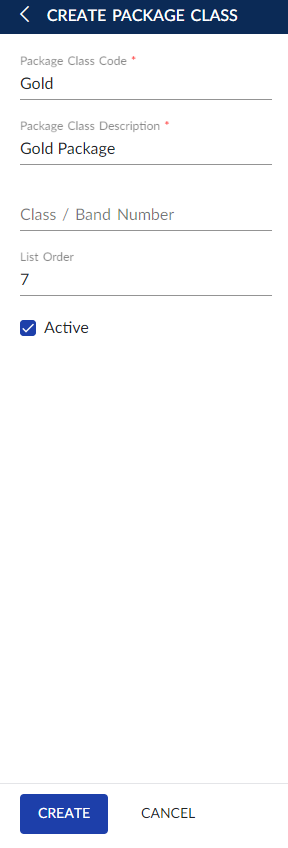
Click Create.
Users can also perform the following actions in the Package Component Categories screen:
-
Modify a package class using the Edit icon.
-
Delete a package class using the Delete icon. A package class cannot be deleted when in use.
-
Copy package class details with a new package class code using the Copy icon.
-
Drag a package class to change positions within the grid using the Drag icon.
-
Search for a package class using the package class code or name.