Sales
Setting Up Sales Calls Call Types
The Sales Calls Call Types option allows users to set up codes that indicate the distinct types of sales calls made at the property.
Breakpoint: 6003 - Sales Calls Call Types (Front Office - Sales)
Perform the following steps to create a sales call type:
Navigate to Settings à Setup à Sales à Sales Calls Call Types.
Enter a code that indicates the type of sales call in the Call Type Code field. Users can enter up to 8 alphanumeric characters.
Enter the name of the sales call type in the Call Type Name field.
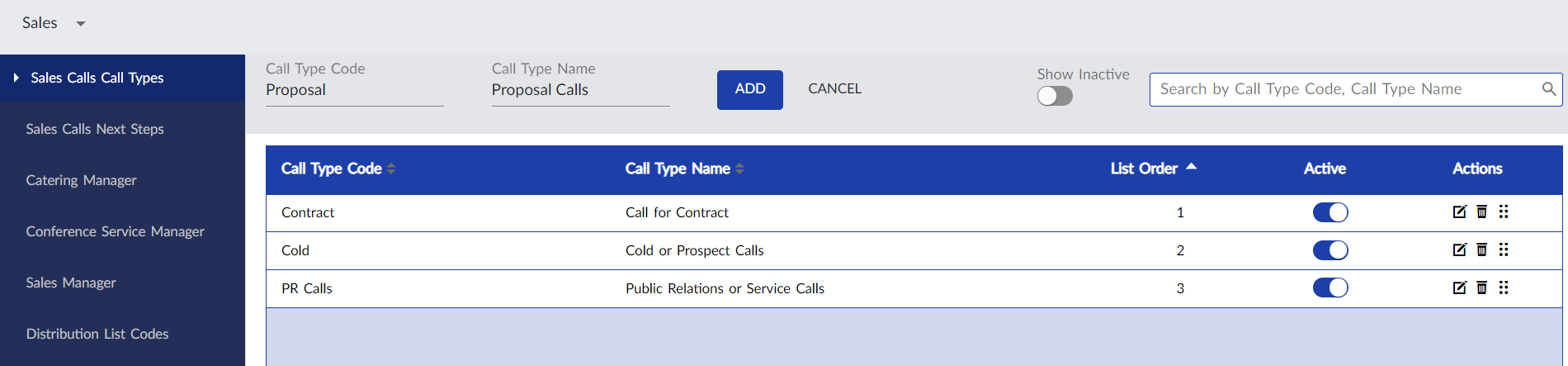
Click Add. The sales call type is created and displayed in the grid.
Users can also perform the following actions in the Sales Calls Call Types screen:
-
Modify the name of the sales call type or deactivate the record using the Edit icon. The code details cannot be modified.
-
Delete the call type using the Delete icon.
-
Drag a call type to change positions within the grid using the Drag icon.
-
Search for a call type using the code or name.