Setting Up Preventative Maintenance Defaults
The Preventative Maintenance Defaults option allows users to view management fees schedule in months, the fee percentage, and to send messages to vendors. This screen helps users set the default values used when creating workorders.
Breakpoint: 70025 - Preventative Maintenance Defaults (Front Office - Housekeeping)
Perform the following steps to setup preventative maintenance defaults:
Navigate to Settings à Maintenance Setup à Preventative Maintenance Defaults. The Preventative Maintenance Defaults screen appears.
Refer to the following table and fill in the fields:
|
Field |
Description |
|---|---|
|
Flat Amount ($) |
The default fixed amount to be considered for payments related to inventory parts and labour costs. |
|
Percentage |
The default percentage to be considered for payments related to inventory parts and labour costs. |
|
Preventative Maintenance Months To Schedule |
Select the frequency (in months) of the management fee schedule for preventative maintenance items. |
|
Third Party E-Mail Message |
The message to be sent to the third-party vendors via email. |
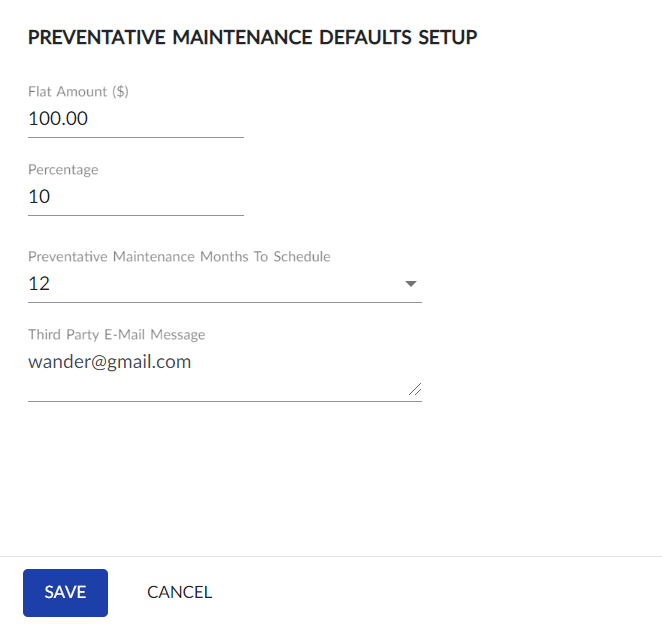
Click Save. The default preventative maintenance settings are complete.
Users can change the configured default values at any time by updating the values and click Save.