Setting Up Property Information
The Property Information option allows users to define the name, address, and phone number of the property.
Perform the following steps to enter property information:
Navigate to Settings à System Setup à Property Information.
Refer to the following table and fill in the fields:
|
Field |
Description |
|---|---|
|
Name |
The name of the property. |
|
Address |
The address of the property. |
|
State |
The state where the property is located. |
|
City |
The city where the property is located. |
|
County |
The county where the property is located. |
|
Postal Code |
The postal code of the property. |
|
Country |
The country where the property is located. |
|
Contact |
|
|
Phone |
Select if the number entered is a mobile, home, or an office phone number. |
|
Country Code |
The Country Calling Code of the property. |
|
Phone Number |
The phone number of the property. |
|
|
Select if the email address is a personal mail address or office mail address. |
|
Email ID |
The email address to contact the property. |
|
Language |
The default language of the property. |
|
Tenant ID |
The tenant ID of the customer; it is system generated for each property and will be defined by Agilysys. |
|
Property code |
The property code of the customer; it is system generated for each property and will be defined by Agilysys. |
|
Tax ID |
The VAT number that must be displayed in the generated invoice. Applicable only for VAT enabled properties. |
|
Minimum Character Search |
The minimum number of characters a user must enter to perform a manual search for guests in the Reservations and Guest menus. |
|
Property Date Format |
The default format in which the date must be displayed across the screens. |
|
Property Timings |
|
|
Arrival Time |
The general check-in time for guests. |
|
Checkout Time |
The general check-out time for guests. |
|
Show weather in Fahrenheit (F) |
When enabled, the weather information in the dashboard is displayed in Fahrenheit than in degree Celsius. |
If the Check-In and Check-Out time configured for arrival and departure are 15:00 and 21:30, a guest can check in to the room only after 15:00 on the arrival date and must check out of the room before 21:30 on the departure date.
The guest keys are automatically locked out after the time specified here if the property uses key interfaces, such as safe locker.
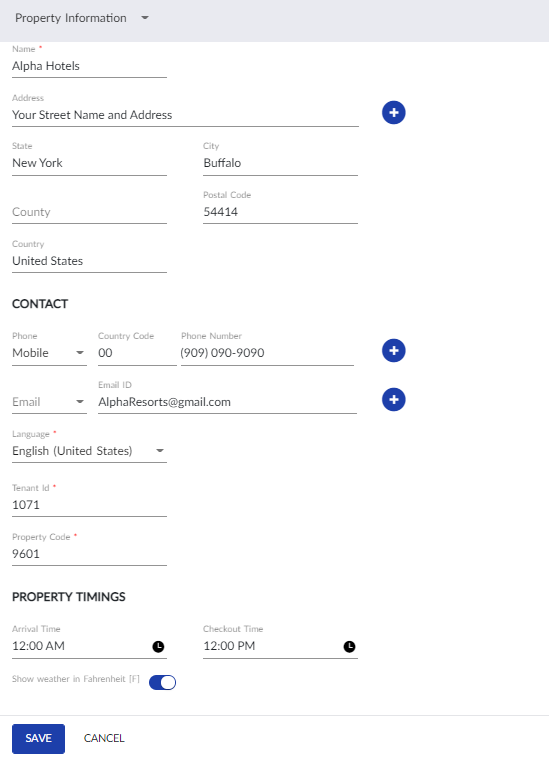
Click Save. The entered details are saved.