31 Day Market Analysis
Report parameters
|
Field |
Description |
|---|---|
|
Report Name |
The name of the report. |
|
From Date |
The start date from when the data must be considered for generating the report. |
|
To Date |
The end date until when the data must be considered for generating the report. |
|
Report Options |
Available options include the following:
|
|
Guest Type/Origin/Segment 1/Segment 2/Tariff/Package |
A list of available report types selected in the previous option. This option always matches with the report type selected in Report Options. |
|
Include Non-Bedded Rooms |
When enabled, the system includes the non-bedded rooms associated with the available room types. |
|
Building |
A drop-down list consisting of all the building codes. All building records created in the Building Codes (Settings à Setup à Room à Building Codes) screen are displayed as options in the drop-down list. Users can select multiple or all the building codes from the list to be displayed in the report generated. |
|
Room Type |
A drop-down list consisting of all the room types. Users can select multiple or all the room types from the list to be displayed in the report generated. |
|
Report Structure |
Available options include the following:
|
|
Get Sold Rate/ Posted Revenue |
|
Sample Report
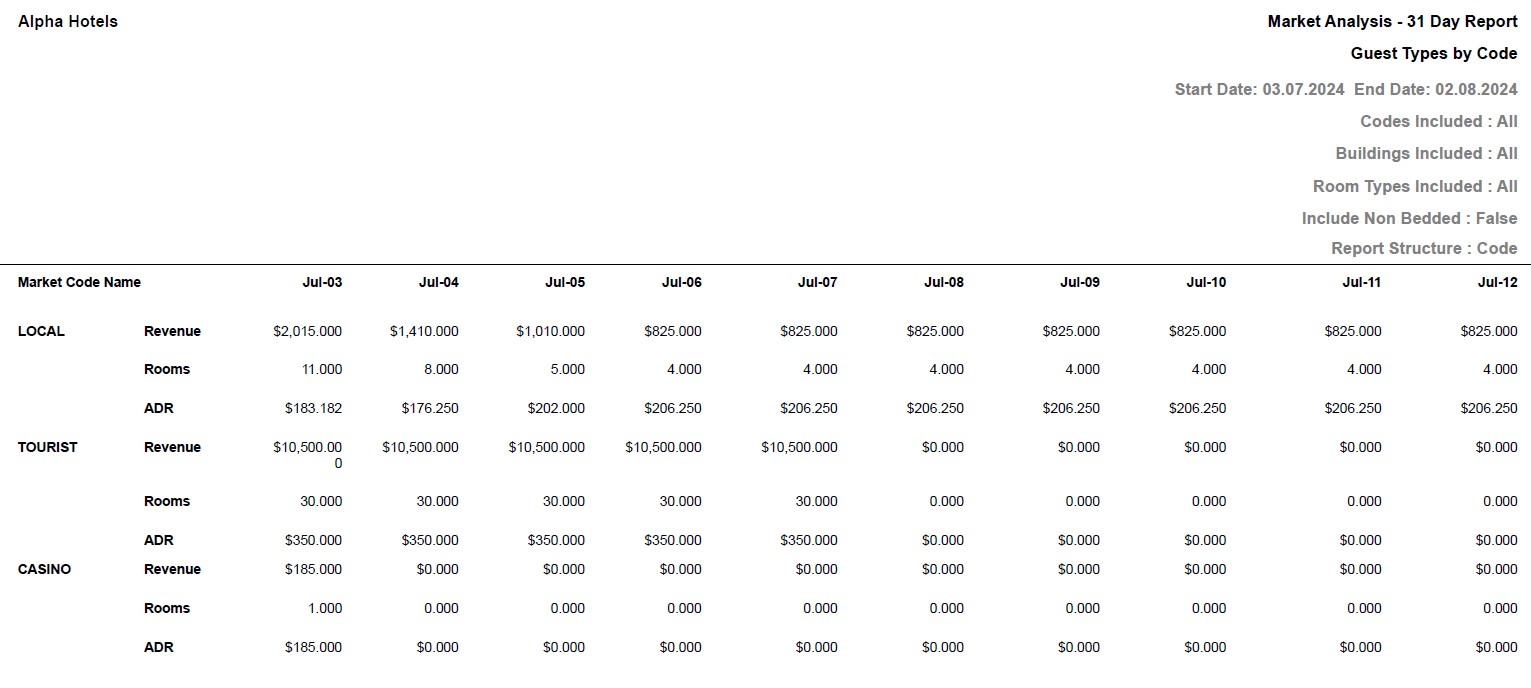
Report Fields
|
Field |
Description |
|---|---|
|
Codes Included |
List of guest types included for the report. |
|
Buildings Included |
List of building types included for the report. |
|
Room Types Included |
List of room types included for the report. |
|
Market Code Name |
Market code name for the market analysis report. |
|
Revenue |
The amount of revenue generated in each day of the given date range. |
|
Rooms |
Number of rooms that generated the revenue on the given date. |
|
ADR |
The system generated average daily rate. |
|
Note: Report considers Sold Rates against the rooms |
|