7 Day Flash Report
Report parameters
|
Field |
Description |
|---|---|
|
Report Name |
The name of the report. |
|
Building Codes |
A drop-down list consisting of all the building codes. All building records created in the Building Codes (Settings à Setup à Room à Building Codes) screen are displayed as options in the drop-down list. Users can select multiple or all the building codes from the list to be displayed in the report generated. |
Sample Report
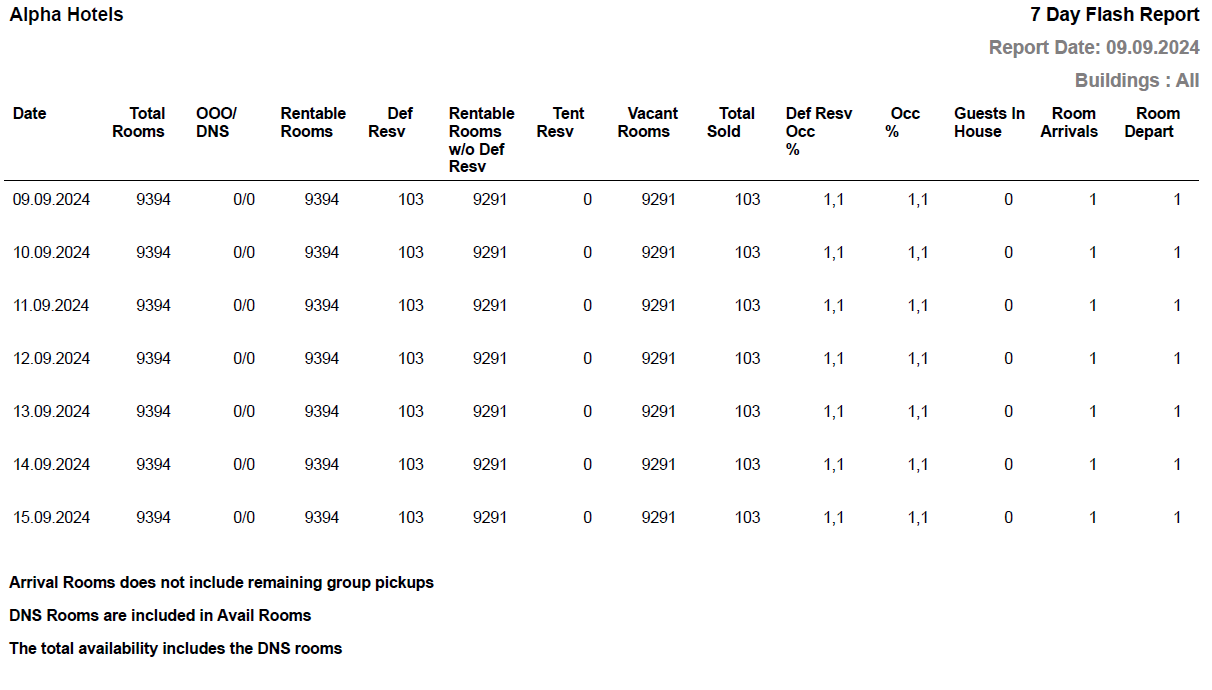
Report Fields
|
Field |
Description |
|---|---|
|
Date |
The date on which the 7 day flash report is generated. |
|
Total Rooms |
The total number of occupied rooms for the given date. |
|
OOO/DNS |
Rooms with out of order/do not sell status. |
|
Rentable Rooms |
Number of rentable rooms for the reservation. |
|
Def Resv |
Number of available rooms in the definite reservation status. |
|
Rentable Rooms |
The difference of values in rentable rooms and def resv columns. |
|
Tent Resv |
Number of rooms in the tentative reservation status. |
|
Vacant Rooms |
Number of vacant rooms for the given period. It is calculated as: Rentable rooms - Tent Resv. |
|
Total Sold |
Number of rooms sold. It includes the rooms in both definite and tentative status. |
|
Def Resv Occ % |
(Total Number of rooms sold/ Total Number of Rooms) × 100 |
|
Occ % |
The percentage of the total number of occupied rooms. (Total Number of Occupied Rooms / Total Number of Rooms) × 100 |
|
Guests in Hse |
Number of guests staying at the property. |
|
Room Arrivals |
Number of rooms scheduled to arrive for the given period. |
|
Room Depart |
Number of rooms scheduled to depart for the given period. |