AR Trace Maintenance Report
Report Parameters
|
Field |
Description |
|---|---|
|
Report Name |
The name of the report. |
|
From Date |
The start date from when the data must be considered for generating the report. |
|
To Date |
The end date until when the data must be considered for generating the report. |
|
Report Options |
Available options include the following:
|
|
Select Options |
Available options include the following:
|
|
A/R Account Names |
A list of all the available A/R account names. This field is displayed when Account Name is selected in select options. |
|
A/R Account Codes |
A list of all the available A/R account codes. This field is displayed when Account Code is selected in select options. |
|
User Name |
A list of all the available usernames. This field is displayed when User Name is selected in select options. |
Sample Report
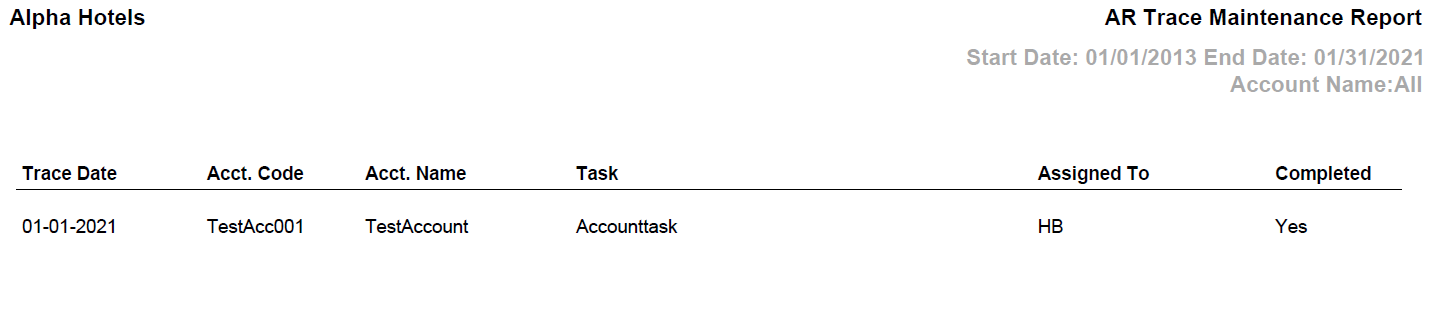
Report Fields
|
Field |
Description |
|---|---|
|
Trace Date |
The trace date that has been configured against the account for the user. |
|
Acct. Code |
The account code associated with the A/R account. |
|
Acct. Name |
The name of the A/R account. |
|
Task |
The description of the task that has been configured in the AR Maintenance screen. |
|
Assigned To |
The user to whom the task is assigned. |
|
Completed |
Indicates whether the task is completed or not. |