All Deposits Summary
Report Parameters
|
Field |
Description |
|---|---|
|
Report Name |
The name of the report. |
|
Include All Dates |
When selected, the report includes all dates. |
|
Group By Building |
When enabled, groups the deposit details for each building type. |
|
Report Date |
The date for which the report must be generated. |
|
Building Codes |
A drop-down list consisting of all the building codes. All building records created in the Building Codes (Settings à Setup à Room à Building Codes) screen are displayed as options in the drop-down list. Users can select multiple or all the building codes from the list to be displayed in the report generated. |
Sample Report
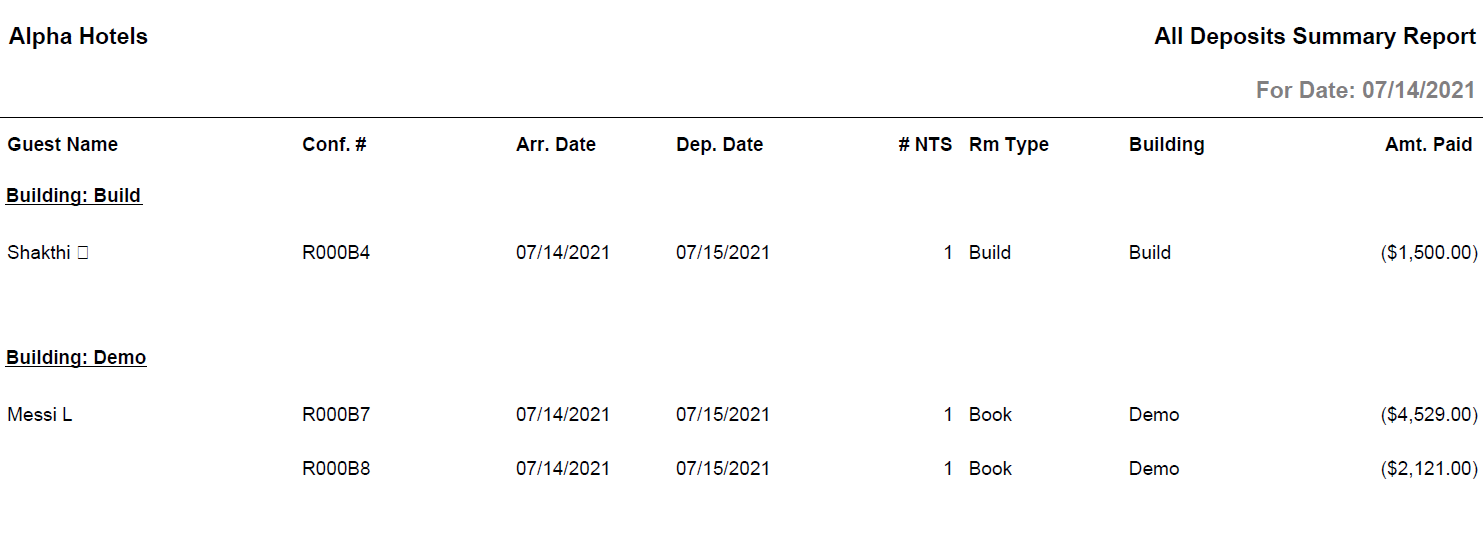
Report Fields
|
Field |
Description |
|---|---|
|
Guest Name |
The last name and first name of the guest added to the reservation. |
|
Conf. # |
The confirmation number of the reservation. |
|
Arr. Date |
The arrival date of the guest. |
|
Dep. Date |
The departure date of the guest. |
|
# NTS |
The number of nights for which the reservation was made. |
|
Rm Type |
The room type selected for the reservation. |
|
Building |
The name of the building where the room is located. |
|
Amt. Paid |
The deposit amount paid by the guest. |