Anticipated Folio Balance
Report Parameters
|
Field |
Description |
|---|---|
|
Report Name |
The name of the report. |
|
Include Reservations With Zero Balances |
When enabled, the report includes reservations with zero balances. |
|
Report Date |
The date for which the report must be generated. |
|
Groups |
Select desired groups from the drop-down menu. Users can select multiple or all the available groups from the list to be displayed in the report generated. |
Sample Report
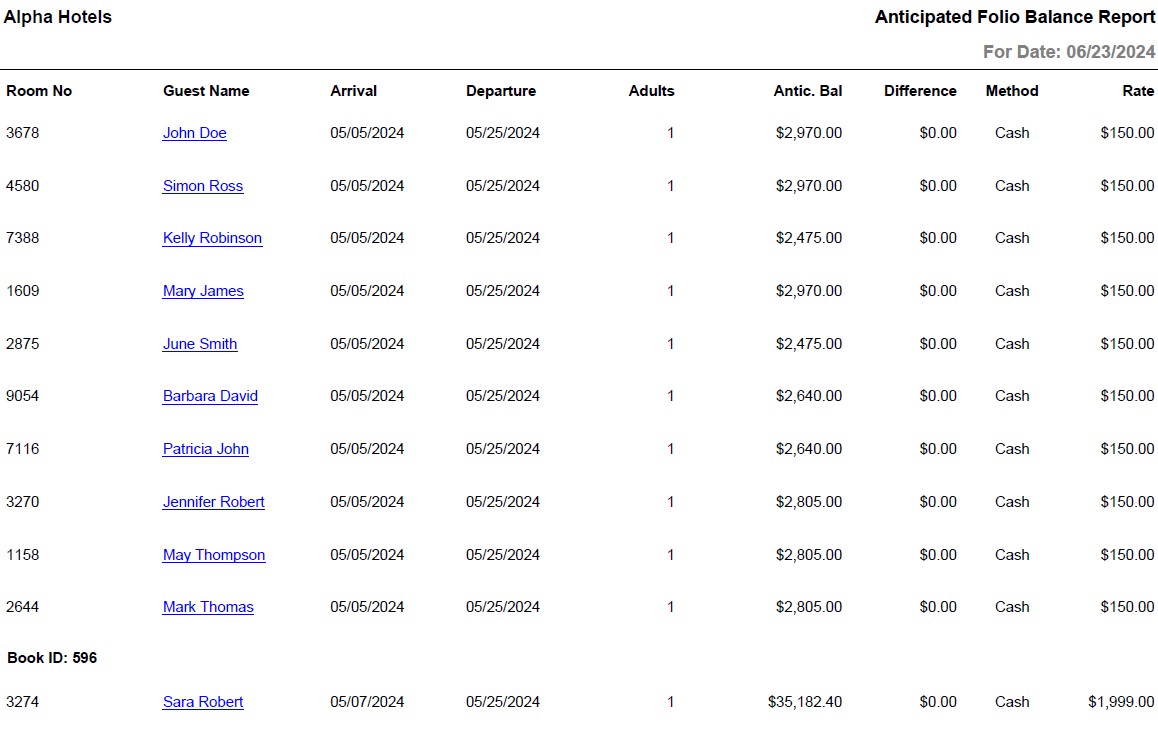
Report Fields
|
Field |
Description |
|---|---|
|
Room No |
The room number of the guest. |
|
Guest Name |
The last name and first name of the guest will appear as a hyperlink and clicking it will navigate the user to the guest record. |
|
Arrival |
The arrival date of the guest. |
|
Departure |
The departure date of the guest. |
|
Adults |
Number of adults on the reservation. |
|
Antic. Bal |
Anticipated balance. |
|
Difference |
The difference between the projected revenue and the actual revenue. |
|
Method |
The method of payment used to settle folio. |
|
Rate |
The rate of the room type selected for the reservation. |
|
Book ID |
The unique ID that identifies the booking. |
|
Anticipated Balance Total |
The sum of Antic. Bal amounts. |