Commission/Gratuity/Service Charge
Commission Report
Report Parameters
|
Field |
Description |
|---|---|
|
Report Name |
The name of the report. |
|
Start Date |
The start date from when the data must be considered for generating the report. |
|
End Date |
The end date until when the data must be considered for generating the report. |
|
Include Inactive Users |
When enabled, the system includes inactive users in the users drop-down list. |
|
User(s) |
A list of all available users for report selection. |
|
Hide Corrected Values |
By default, this flag will be disabled. |
|
Page Break |
When enabled, the system adds page breaks in the report. |
Sample Report
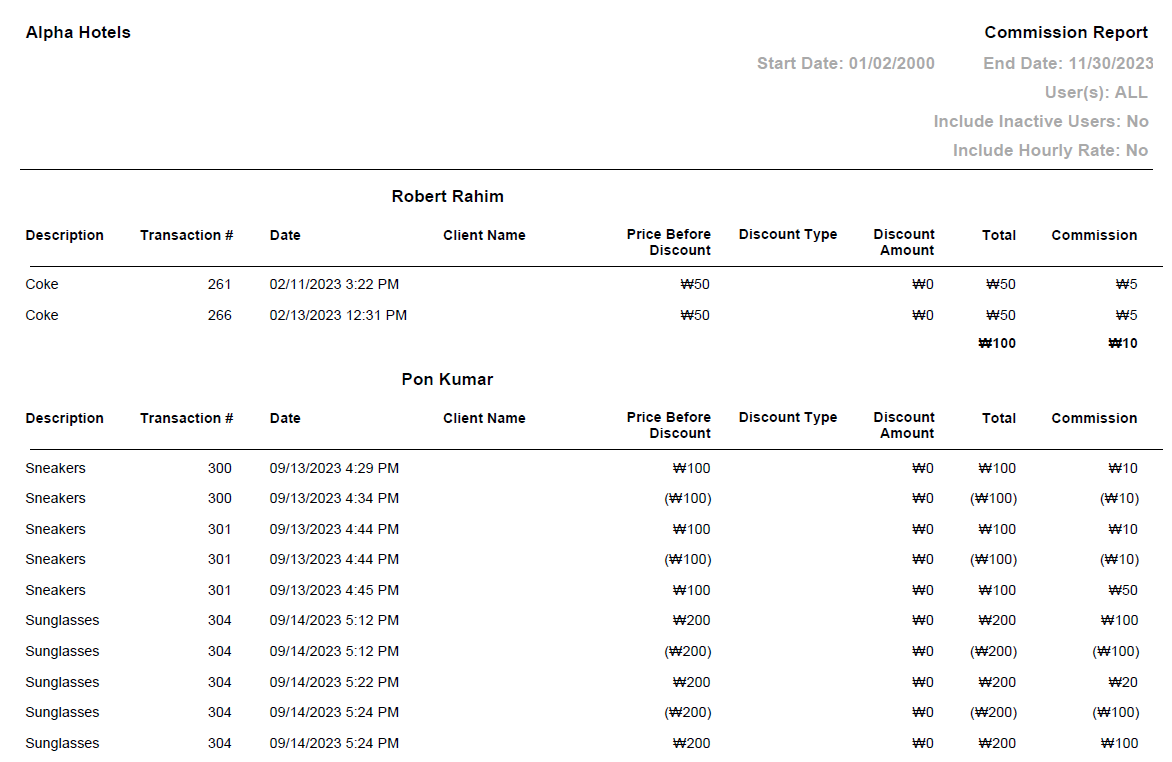
Report Fields
|
Field |
Description |
|---|---|
|
Description |
The description of the retail item. |
|
Transaction # |
The transaction number of the retail item. |
|
Date |
The date on which the retail transaction is done. |
|
Client Name |
The name of the client. |
|
Price Before Discount |
The purchase amount of items before applying the discount. |
|
Discount Type |
The type of discount applied to items in the transaction. |
|
Discount Amount |
The discount amount applied to items in the transaction. |
|
Total |
The total amount of transaction. |
|
Commission |
The amount of commission. |