Comp Accounting
Comp Posting
Report Parameters
|
Field |
Description |
|---|---|
|
Report Name |
The name of the report. |
|
Start Date |
The start date from when the data must be considered for generating the report. |
|
End Date |
The end date until when the data must be considered for generating the report. |
|
Sort Options |
Available options include the following:
|
|
Report Options |
Available options include the following:
|
|
Display By Post Department (Detail Report Only) |
The toggle switch can be enabled only when detail report is chosen under report options. When enabled, the postings are displayed by department in the report. |
|
Authorizers |
Select an authorizer from the drop-down menu. Users can select multiple or all the authorizers from the list to be displayed in the report generated. |
Sample Report
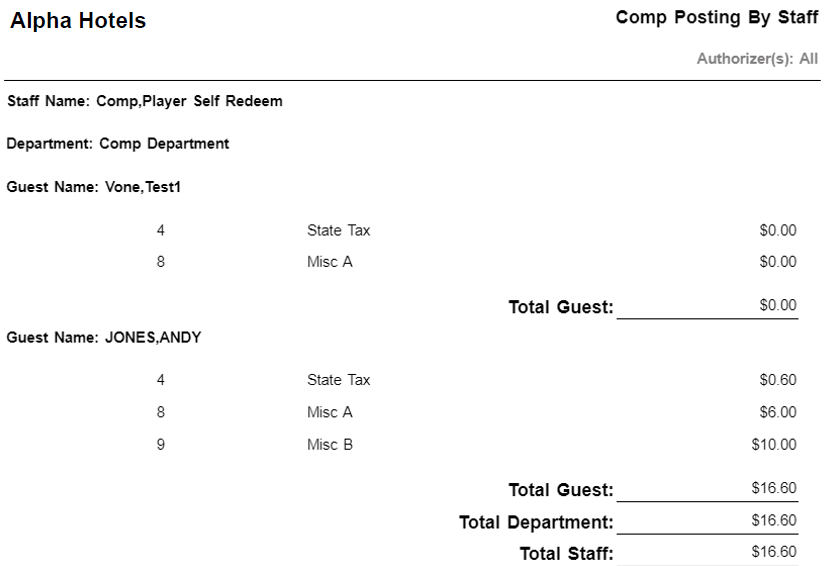
Report Fields
|
Field |
Description |
|---|---|
|
Staff Name |
The last name and first name of the staff. |
|
Department |
The name of the department to which the staff member belongs. |
|
Guest Name |
The last name and first name of the guest. |
|
Total Guest |
The sum of all postings of a guest. |
|
Total Department |
The sum of all postings of a department. |
|
Total Staff |
The sum of all postings of a staff. |
|
Total Comps |
Sum of amounts for all comp rooms. |
|
Note: Report considers Posted Rates against the rooms |
|