Departures
Report parameters
|
Field |
Description |
|---|---|
|
Report Name |
The name of the report. |
|
Report Date |
The date for which the report must be generated. |
|
Building Codes |
A drop-down list consisting of all the building codes. All building records created in the Building Codes (Settings à Setup à Room à Building Codes) screen are displayed as options in the drop-down list. Users can select multiple or all the building codes from the list to be displayed in the report generated. |
|
Report Options |
Available options include the following:
|
|
Sort Options |
Available options include the following:
|
|
Other Report options |
Available options include the following:
|
|
Include Non-Bedded Rooms |
When enabled, the system includes the non-bedded rooms associated with the available room types. |
|
Display Group Names |
When enabled, the system displays the group names in the report. |
|
Display Split Folios |
When enabled, the system displays the split folios in the report. |
Sample Report
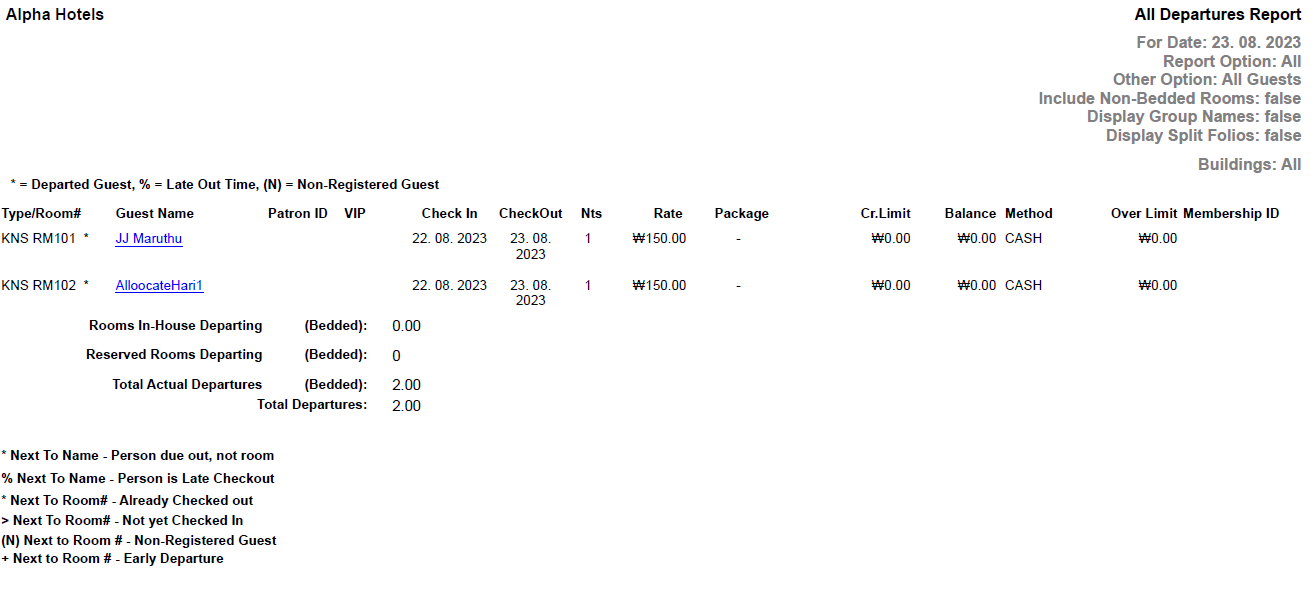
Report Fields
|
Field |
Description |
|---|---|
|
Type/Room # |
Room Type/Room number of the guest. |
|
Guest Name |
The first name and the last name of the guest will appear as a hyperlink and clicking it will navigate the user to the guest record. |
|
Patron ID |
The patron ID of the guest. |
|
VIP |
The code that identifies the VIP type of the guest at the property. |
|
Check In |
The date on which the guest checked-in the room. |
|
Nts |
The number of nights for which the reservation was made. |
|
Fol# |
The folio number. |
|
Rate |
The rate defined for the selected room type. |
|
Package |
The package name of the package added to reservation if any. |
|
Cr. Limit |
Credit limit allowed for the guest. |
|
Balance |
The total postings in the guest folio. |
|
Method |
Mode of payment used for the transaction. |
|
Over Limit |
Credit Limit - Balance. |
|
Membership ID |
The member ID of the guest. |
|
Rooms In-House Departing (Bedded) |
The total number of rooms that were scheduled to depart but have not yet been departed. |
|
Reserved Rooms Departing (Bedded) |
Number of bedded rooms where the reserved guests are departing in the given date. |
|
Total Departures |
Total number of departures for the given date. |