Exceeded Credit Limit
Report parameters
|
Field |
Description |
|---|---|
|
Report Name |
The name of the report. |
|
Is Non-bedded |
When enabled, the system includes non-bedded rooms associated with the available room types. |
|
Payment Methods |
A drop-down list consisting of all available the payment methods. All payment method records created in the Payment Methods screen (Settings à Retail Setup à Code Setup à Payment Methods) will be displayed in the drop-down list. Users can select all or multiple payment methods from the drop-down list to be displayed in the report generated. |
|
Show Status Reason |
When enabled, the transaction status and the reason for failure will be displayed in the report. |
Sample Report
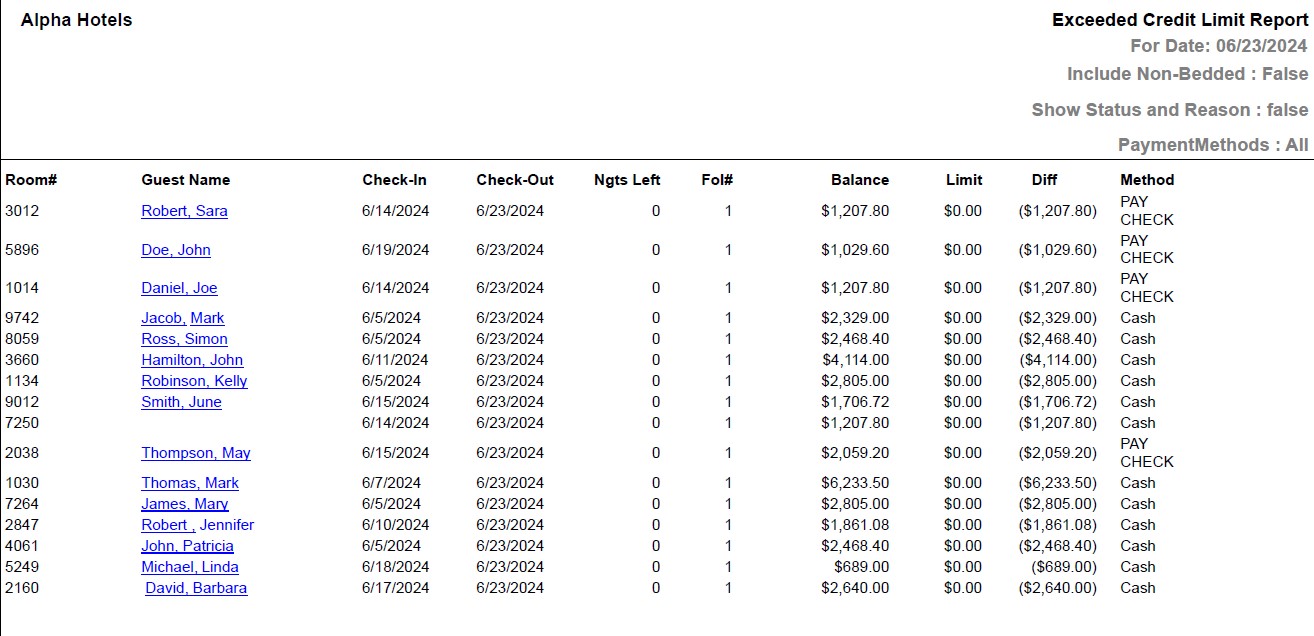
Report Fields
|
Field |
Description |
|---|---|
|
Room # |
The room number of the guest. |
|
Guest Name |
The first name and the last name of the guest will appear as a hyperlink and clicking it will navigate the user to the guest record. |
|
Check-In |
The date when the guest checked-in. |
|
Check-Out |
The date when the guest checked out. |
|
Ngts Left |
Number of nights left for the guest in the reservation. |
|
Fol # |
The folio number where the credit balance remains. |
|
Balance |
The credit balance amount. |
|
Limit |
The credit limit for the guest. |
|
Diff |
The difference of credit balance and credit limit. |
|
Method |
The payment method associated with the folio. Example: Cash, Master card. |
|
Updated Transaction Status |
The status of the transaction for each reservation. This column will appear only if the Show Status Reason flag is enabled during report generation. |
|
Reason |
The reason why the transaction failed. This field will appear only if the Show Status Reason flag is enabled during report generation. |