Folio Balances
Report parameters
|
Field |
Description |
|---|---|
|
Report Name |
The name of the report. |
|
Group By Building |
When enabled, the system groups the folio balances of each building. |
|
Report Options |
Available options include the following:
|
|
Sort Options |
Available options include the following:
|
|
Folio Balance Date |
The date for which the report must be generated. |
|
Building Codes |
A drop-down list consisting of all the building codes. All building records created in the Building Codes (Settings à Setup à Room à Building Codes) screen are displayed as options in the drop-down list. Users can select multiple or all the building codes from the list to be displayed in the report generated. |
|
Include Deposits |
When selected, any deposits paid for reservations will be included in the generated report. |
|
Show Only Inhouse |
When selected, the generated report will only include details of reservations in the In House status. |
|
Include Zero Balance |
When selected, the generated report will include details of reservations in the In House status with a zero folio balance. This flag will be enabled for selection only when the Show Only Inhouse is enabled. |
Sample Report
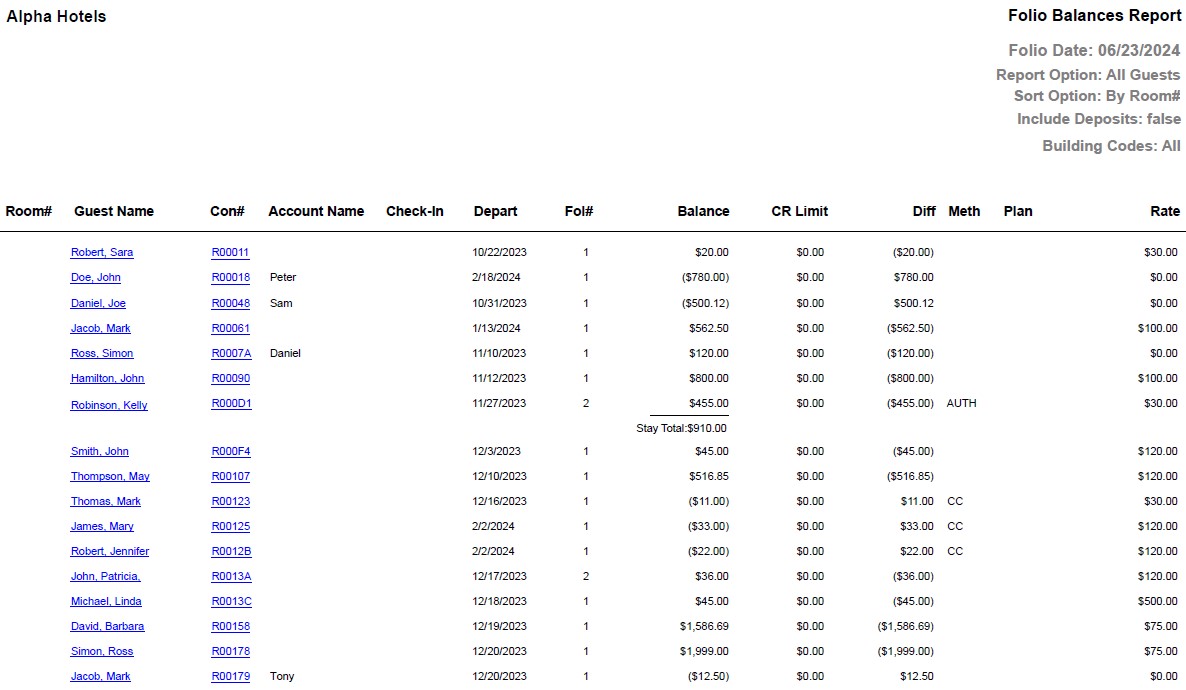
Report Fields
|
Field |
Description |
|---|---|
|
Room # |
The room number of the guest. |
|
Guest Name |
The first name and the last name of the guest will appear as a hyperlink and clicking it will navigate the user to the guest record. |
|
Con# |
The confirmation number of the reservation will appear as a hyperlink and clicking it will navigate the user to the reservation record. |
|
Account Name |
The name of the account. |
|
Check-In |
The date on which the guest checked-in the room. |
|
Depart |
The date of departure of the guest. |
|
Fol # |
The folio number. |
|
Balance |
The total amount of guest charges or postings in any folio. |
|
Limit |
The credit limit for the guest. |
|
Diff |
The difference of balance and limit is displayed. |
|
Meth |
The payment method associated with the folio. Example: Cash, Master card. |
|
Rate |
The rate associated with the booking. |