Frontdesk
Inhouse Guest Complaints
Report Parameters
|
Field |
Description |
|---|---|
|
Report Name |
The name of the report. |
|
Start Date |
The start date from when the data must be considered for generating the report. |
|
End Date |
The end date until when the data must be considered for generating the report. |
|
Sort Options |
The criteria by which the data in the report must be sorted. Available options include the following:
|
|
Report Options |
The data that must be included in the report. Available options include the following:
|
|
Category |
A drop-down list consisting of all department categories for report selection. The records created in the Category (Settings à Setup à General à Category) screen are displayed as options in the drop-down list. Users can select multiple or all the categories. |
|
Manager |
A drop-down list consisting of all managers for report selection. Users can select multiple or all the available managers. |
Sample Report
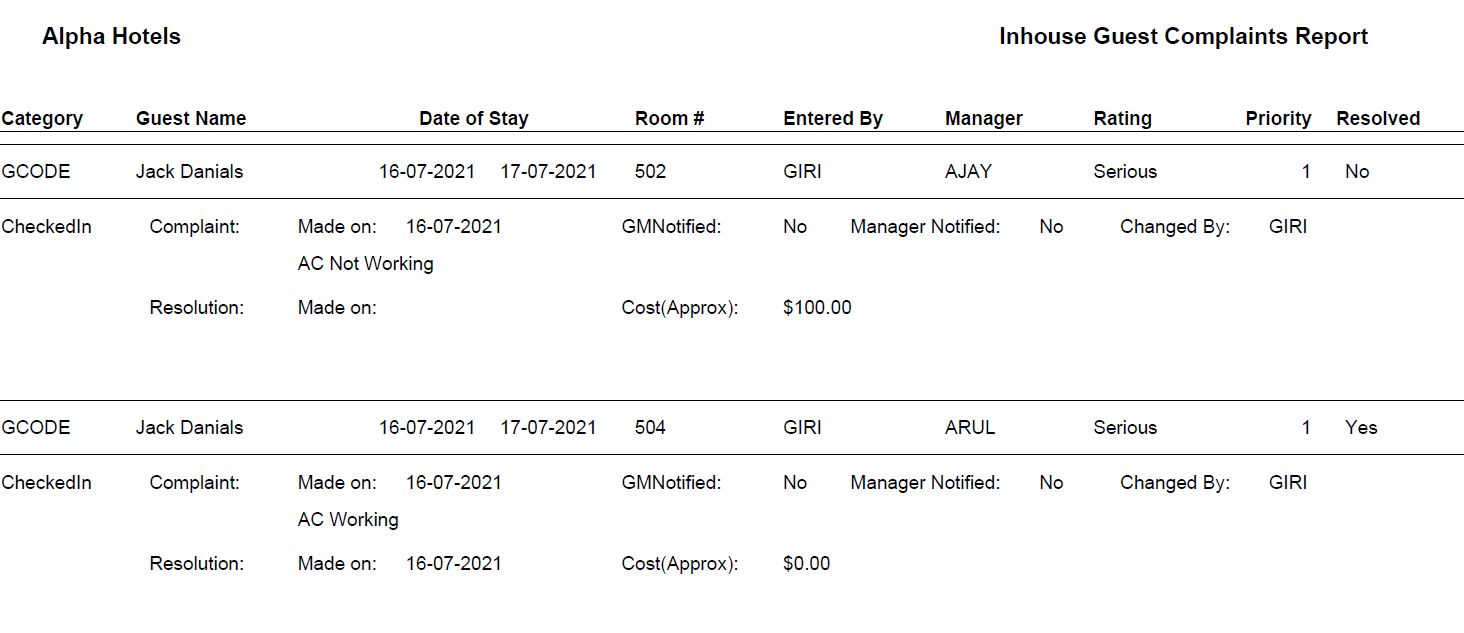
Report Fields
|
Field |
Description |
|---|---|
|
Category |
The department category to which the complaint is associated. |
|
Guest Name |
The last name and first name of the guest. |
|
Date of Stay |
The stay dates of the guest at the property. |
|
Room # |
The room number assigned to the guest. |
|
Entered By |
The user ID of the user who raised the guest complaint. |
|
Manager |
The manager to whom the complaint has been mapped. |
|
Rating |
The code indicating the severity of the complaint, such as, Serious, Reasonable, Unactionable. |
|
Priority |
The number indicating the importance of the complaint. |
|
Resolved |
Indicates whether the complaint has been resolved. Available values include Yes and No. |
|
Complaint Made on |
The date on which the complaint was made. |
|
GMNotified |
Indicates whether the general manager was notified when the guest complaint was raised. |
|
Manager Notified |
Indicates whether the manager was notified about the guest’s complaint. |
|
Changed By |
The name of the user who updated the status of the complaint. |
|
Resolution Made on |
The date on which the complaint was resolved. |
|
Cost (Approx) |
The estimated cost of resolving the complaint. |
|
Total Cost of Complaints |
The total cost incurred for resolving the guest complaint. |