Gift Cards
Gift Card Redeem
Report Parameters
|
Field |
Description |
|---|---|
|
Report Name |
The name of the report. |
|
Start Date |
The start date from when the data must be considered for generating the report. |
|
End Date |
The end date until when the data must be considered for generating the report. |
|
Card Number |
Enter a gift card number to generate report only for the entered card number. |
|
Users |
A drop-down list consisting of all the users. |
|
Include Inactive Clerks |
When enabled, inactive clerks will be included in the report. |
Sample Report
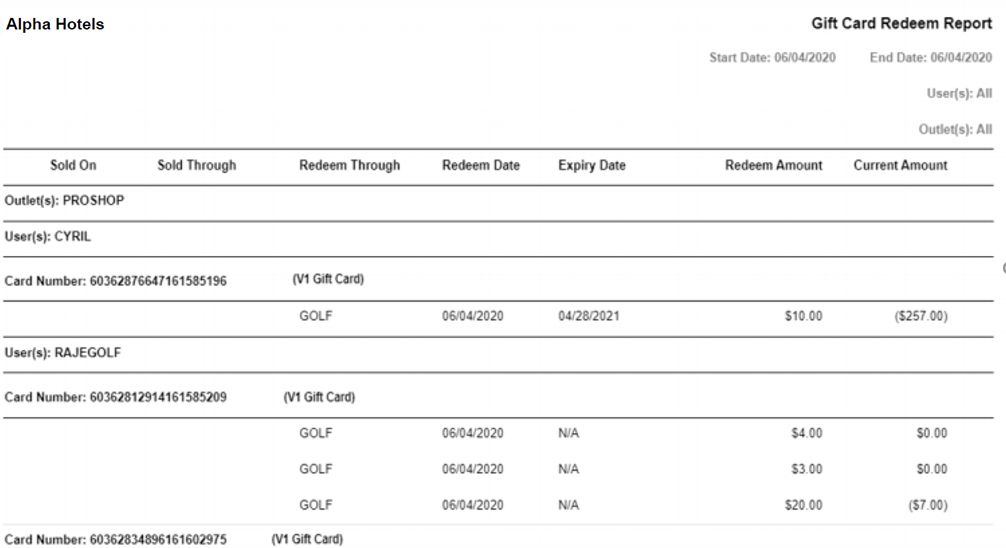
Report Fields
|
Field |
Description |
|---|---|
|
Sold On |
The date when the gift card was issued for the first time. The date will be displayed only in the property where the initial top-up was done. The field will be blank when the report is generated in any other property. |
|
Sold Through |
The product through which the gift card was issued for the first time. The product name will be displayed only in the property where the initial top-up was done. The field will be blank when the report is generated in any other property. |
|
Redeem Through |
The product through which the transaction was settled. |
|
Redeem Date |
The date of redemption. |
|
Expiry Date |
The expiry date of the gift card. N/A is displayed if there is no expiry for gift card. The gift card never expires if Allow Expiration checkbox is disabled in Settings à Retail Setup à Code Setup à Gift Cards. |
|
Redeem Amount |
The amount redeemed using the gift card when a transaction was settled. |
|
Current Amount |
The current amount available. This amount is calculated based on the balance amount added at the property. |
|
Outlet(s) |
The default outlet to which the gift card is mapped. |
|
User(s) |
The username of the user who performed the transaction. |
|
Card Number |
The gift card number used to settle a transaction. |