Group Resume
Report Parameters
|
Field |
Description |
|---|---|
|
Report Name |
The name of the report. |
|
Start Date |
The start date from when the data must be considered for generating the report. |
|
End Date |
The end date until when the data must be considered for generating the report. |
|
Definite |
This option includes definite bookings in the report. |
|
Tentative |
This option includes tentative bookings in the report. |
|
Prospect |
This option includes prospective bookings in the report. |
|
Booking Name |
Select a booking name from the drop-down menu. |
|
Contact |
The contact for the function booking. |
|
Comments |
Enter the comments for the report. |
|
Print Contracted Room Information |
When enabled, contracted room information is printed in the group resume report. |
|
Print Blocked Room Information |
When enabled, blocked room information is printed in the group resume report. |
|
Print Booking Comments |
When enabled, the booking comments are printed in the report. |
|
Do Not Print Revenue Information |
When enabled, revenue information is not printed in the report. |
|
Include Shoulder Dates |
By default, the flag will be enabled. |
Sample Report
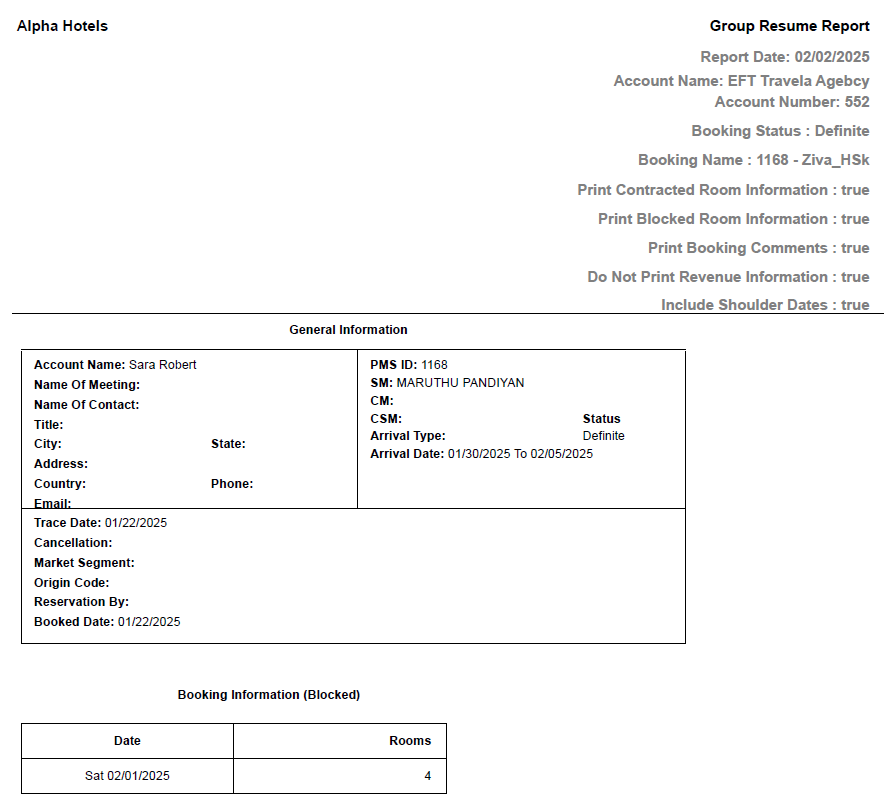
Report Fields
|
Field |
Description |
|---|---|
|
Account Name |
The name of the account associated with the group. |
|
Account Number |
The account number associated with the group. |
|
General Information |
|
|
Name Of Meeting |
The name of the meeting associated with the group. |
|
Name Of Contact |
The group contact name. |
|
Title |
The title that precedes the contact’s name. |
|
City |
The name of the city to which the contact belongs. |
|
State |
The name of the state to which the contact belongs. |
|
Address |
The address details of the contact. |
|
Country |
The name of the country to which the contact belongs. |
|
Phone |
The phone number of the contact. |
|
|
The email address of the contact. |
|
PMS ID |
The PMS ID number of the property. |
|
SM |
The details of the sales manager associated with the group. |
|
CM |
The details of the catering manager associated with the group. |
|
CSM |
The details of the conference service manager associated with the group. |
|
Status |
The status code for the group booking. |
|
Arrival Type |
The arrival type code for the group booking. |
|
Arrival Date |
The first arrival date for the group bookings. |
|
Trace Date |
The date the trace was last run for the bookings. |
|
Cancellation |
The cancellation code associated if the group booking code is cancelled. |
|
Market Segment |
The market segment code for the group booking. |
|
Origin Code |
The origin code for the group booking. |
|
Reservation By |
The name of the user who made the booking. |
|
Booked Date |
The dates for the group booking. |
|
Booking Information (Blocked) |
|
|
Date |
The date for which the booking is made. |
|
Rooms |
Number of rooms booked. |
|
Note: Report considers Sold Rates against the rooms |
|