Groups In-House Detail Report
Report Parameters
|
Field |
Description |
|---|---|
|
Report Name |
The name of the report. |
|
Group In-House Report |
|
|
Booking Names |
Select the preferred booking name from the drop-down list. Users can select multiple or all the available booking names. |
|
Report Options |
Available options include the following:
|
|
Print Without Rates |
When enabled, the report is printed without including rates. |
|
Group Folio Balance Report |
|
|
Booking Names |
Select the preferred booking name from the drop-down list. Users can select multiple or all the available booking names. |
|
From Date |
Select the preferred date from when the data must be considered for generating the report. |
|
End Date |
Select the preferred date until when the data must be considered for generating the report. |
|
Group Master Only |
|
Sample Report - Group In-House Detail Report
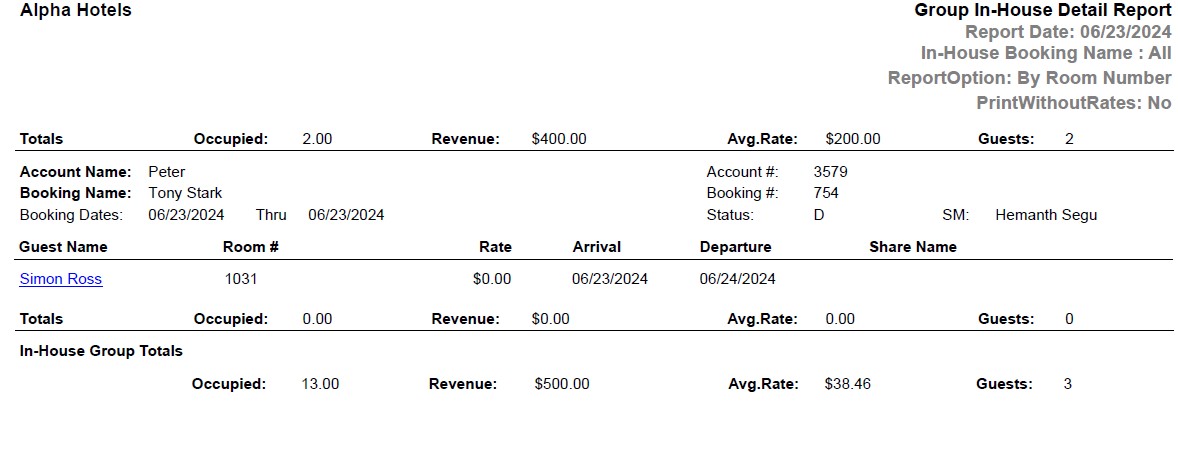
Sample Report - Group Folio Balance Detail Report

Report Fields
|
Field |
Description |
|---|---|
|
Account Name |
The name of the account associated with the group. |
|
Account # |
The account number associated with the group. |
|
Booking Name |
The name of the booking made by the group. |
|
Booking # |
The identification number of the booking event or meeting at the property. |
|
Booking Dates |
The booking dates associated with the reservation. |
|
Status |
The status of the group reservation. |
|
SM |
The name of the sales manager. |
|
Guest Name |
The last name and first name of the guest added to the reservation will appear as a hyperlink and clicking it will navigate the user to the guest record. |
|
Room # |
The room number of the guest. |
|
Rate |
The rate charged for the room. |
|
Arrival |
The arrival date of the guest. |
|
Departure |
The departure date of the guest. However, the title of this field in group folio balance detail report is Depart. |
|
Share Name |
The name of person with whom the reservation is shared. |
|
Occupied |
Number of rooms occupied. |
|
Revenue |
The amount of revenue generated. |
|
Avg. Rate |
The average rate charged for the group room. |
|
Guests |
Number of guests. |
|
In-House Grand Totals |
The totals of occupied, revenue, Avg. rate and guests are displayed under the respective grand totals columns. |
|
Check-in |
The date the guest checked in. |
|
Folio# |
The folio number |
|
Balance |
The balance amount that must be paid by the guest. |
|
Limit |
The credit limit for the guest. |
|
Diff |
The difference between the projected revenue and the actual revenue. |
|
Meth |
The method of payment used to settle folio. |
|
Stay Total |
The total balance amount that must be paid by the guest. |