Groups
Account Listing
Report Parameters
|
Field |
Description |
|---|---|
|
Report Name |
The name of the report. |
|
Start Date |
The start date from when the data must be considered for generating the report. |
|
End Date |
The end date until when the data must be considered for generating the report. |
|
Report Options |
Available options include the following:
|
|
Sort Options |
Available options include the following:
|
|
Select Manager |
Select a desired manager from the drop-down menu. Users can select multiple or all the available managers from the list to be displayed in the report generated. |
|
Include Day Group Rooms |
When enabled, day group rooms will be included in the report. |
Sample Report
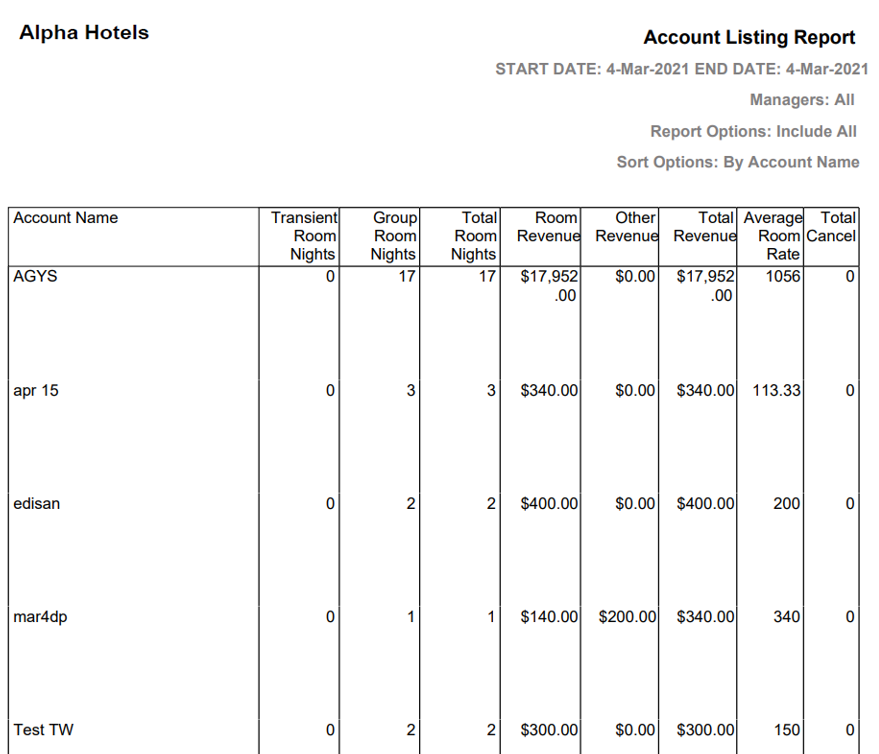
Report Fields
|
Field |
Description |
|---|---|
|
Account Name |
The name of the group account. |
|
Transient Room Nights |
Number of room nights for transient guests. |
|
Group Room Nights |
Number of room nights for group booking guests. |
|
Total Room Nights |
Sum of transient room nights and group room nights. |
|
Room Revenue |
The amount of revenue generated from rooms. |
|
Other Revenue |
The amount of revenue generated by any other means other than by room. |
|
Total Revenue |
Sum of room revenue and other revenue fields. |
|
Average Room Rate |
The average rate for room bookings. |
|
Total Cancel |
The total number of cancellations. |