Guest Type and Room Type Breakdown by Date
Report parameters
|
Field |
Description |
|---|---|
|
Report Name |
The name of the report. |
|
Start Date |
The start date from when the data must be considered for generating the report. |
|
End Date |
The end date until when the data must be considered for generating the report. |
|
Report Options |
Available options include the following:
|
|
Sort Options |
Available options include the following:
|
Sample Report
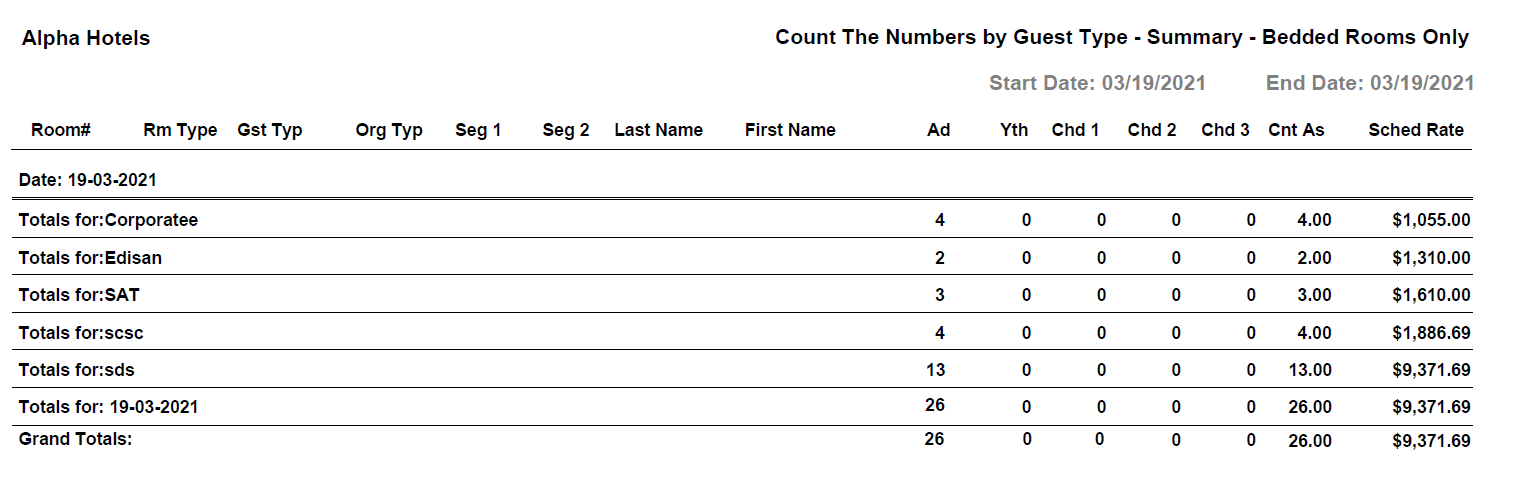
Report Fields
|
Field |
Description |
|---|---|
|
Room # |
The room number of the guest. |
|
Rm Type |
The room type to which the room number belongs. |
|
Gst Typ |
The guest type selected when creating the reservation. |
|
Org Typ |
The code that represents the origin of the guest, that is, the source where the guest came from or heard about the property. |
|
Seg 1 |
The segment 1 code for the reservation. |
|
Seg 2 |
The segment 2 code for the reservation. |
|
Last Name |
The last name of the guest. |
|
First Name |
The first name of the guest. |
|
Ad |
Number of adults on the reservation. |
|
Yth |
Number of youths on the reservation. |
|
Chd 1 |
Number of teenagers on the reservation. |
|
Chd 2 |
Number of young children on the reservation. |
|
Chd 3 |
Number of toddlers in the guest reservation. |
|
Cnt As |
The total number of guests, that is, the sum of number of adults, youths, teenagers, young children, and toddlers. |
|
Sched Rate |
The room rate for the room. |
|
Date |
The date by which the guest type and room type data is shown. |
|
Totals for |
The total amount for the guest reservation on the given date. |
|
Grand Totals |
The grand total amount for the guest within the given date range for the breakdown report. |