Housekeeping Sheet
Report Parameters
|
Field |
Description |
|---|---|
|
Report Name |
The name of the report. |
|
Include Names Of Arrivals |
When enabled, the system includes names of arrivals in the report. |
|
Sort Options |
Available options include the following:
|
|
Sort By Building Code |
When enabled, the system sorts the records by building codes. |
|
Report Options |
Available options include the following:
|
|
Housekeeping Periods |
A drop-down list consisting of all housekeeping periods. Users can select multiple or all the housekeeping periods from the list to be displayed in the report generated. |
|
Building Codes |
A drop-down list consisting of all the building codes. All building records created in the Building Codes (Settings à Setup à Room à Building Codes) screen are displayed as options in the drop-down list. Users can select multiple or all the building codes from the list to be displayed in the report generated. |
Sample Report
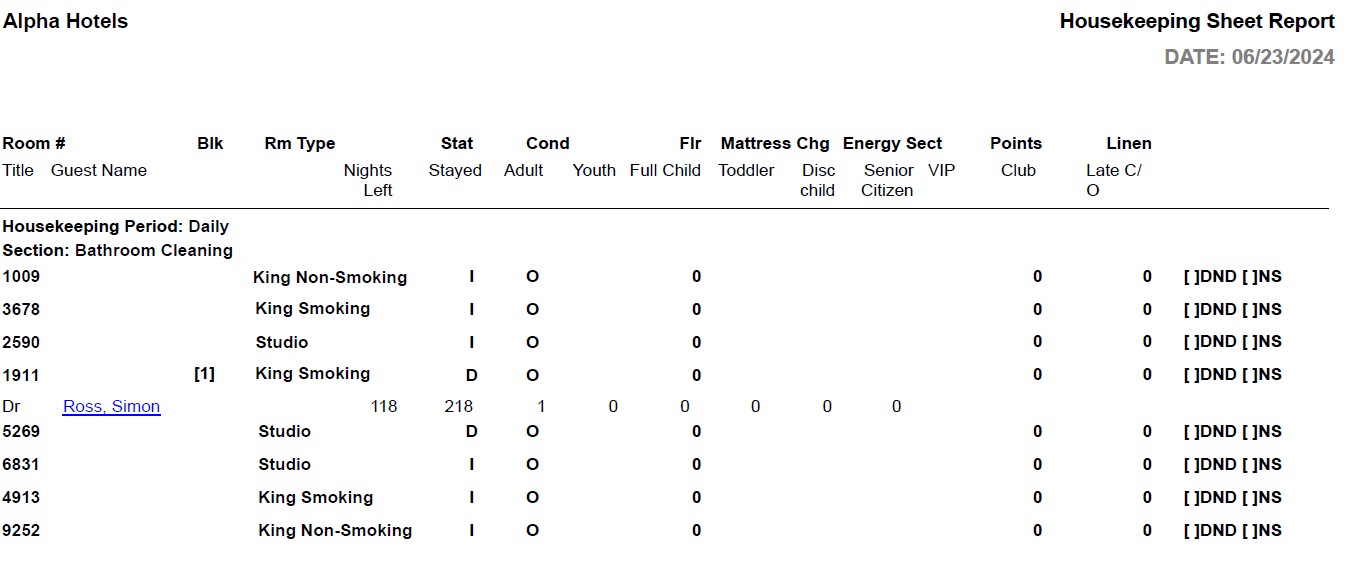
Report Fields
|
Field |
Description |
|---|---|
|
Room # |
The room number of the guest. |
|
Rm Type |
The room type to which the room number belongs. |
|
Stat |
The occupancy status of the room. |
|
Cond |
Current housekeeping status of the room. The status can be:
|
|
Flr |
The floor at which the room is located. |
|
Mattress Chg |
The date when the mattresses were last changed. |
|
Energy Sect |
The energy section to which the room is mapped. The energy section code of the floor or housekeeping section entered for the room in the Room Definitions screen is displayed here. |
|
Points |
The housekeeping points that were credited to the housekeeper. |
|
Linen |
The linen clothing, such as towels, bedding sets, and so on required for each room type. |
|
Title |
The forms-of-address that precedes the guest’s name. |
|
Guest Name |
The last name and first name of the guest will appear as a hyperlink and clicking it will navigate the user to the guest record. |
|
Nights Left |
Number of nights left for the guest in the reservation. |
|
Stayed |
The number of nights the guest stayed at the property. |
|
Adult |
The number of adults on the reservation. |
|
Youth |
The number of youths on the reservation. |
|
Child |
The number of children on the reservation. |
|
Toddler |
The number of toddlers on the reservation. |
|
VIP |
VIP status of the guest, if any. |
|
Club |
A member of the club, if applicable. |
|
Late C/O |
The check-out time requested by guest which is after normal check-out hours. |