Inventory Audit Trail
Report Parameters
|
Field |
Description |
|---|---|
|
Report Name |
The name of the report. |
|
Start Date |
The start date from when the data must be considered for generating the report. |
|
End Date |
The end date until when the data must be considered for generating the report. |
|
Search by Item # |
Enter the item number to search the preferred item. |
|
Search by Description |
Enter the item description to search the preferred item. |
|
Search by Supplier |
Enter the name of the supplier to search the preferred item. |
|
Search by Bar Code # |
Enter the bar code scanner number to search the preferred item. |
|
Search by Other Scanner Code |
Enter other scanned codes (if any) to search the preferred item. |
|
Category |
A list of all available categories for report selection. |
|
Sub Category 1 to 5 |
A list of all the available subcategories based on the selected category are displayed. |
|
Search by Supplier Item # |
Enter the supplier item number to search the preferred item. |
|
Purchase Order # |
Enter the purchase order number to search the preferred item. |
|
Include Inactive Items |
When enabled, includes inactive items in the report. |
|
Include Non-inventory Items |
When enabled, includes all non-inventory items in the report. |
Sample Report
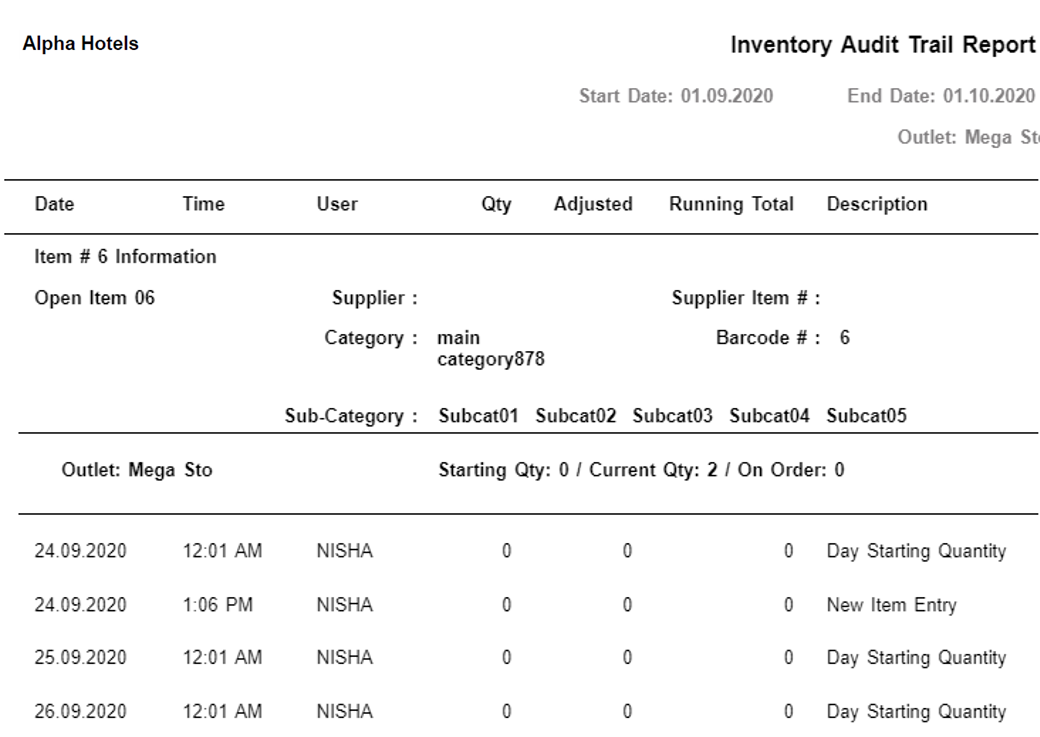
Report Fields
|
Field |
Description |
|---|---|
|
Date |
The transaction date of the item(s). |
|
Time |
The transaction time of the item(s). |
|
User |
The name of the user. |
|
Qty |
The number of items available. |
|
Adjusted |
The available or adjusted number of item(s). |
|
Running Total |
The on-hand quantity of the item(s). |
|
Description |
The transaction details of the item(s)- return, void, transferred or sold. |
|
Outlet |
The name of the associated outlet. |
|
Starting Qty |
The initial quantity on hand of the items in the outlet. |
|
Current Qty |
The updated quantity on hand of the items in the outlet. |
|
On Order |
The quantity of items ordered. |