Reservations by State
Report Parameters
|
Field |
Description |
|---|---|
|
Report Name |
Select the Reservation By State option. |
|
Start Date |
The start date from when the report must be generated. |
|
End Date |
The end date until when the report must be generated |
|
State |
Select the preferred states to fetch details of only the guests from the selected states. Whenever a guest record with new state in address is added, the state name will be updated in this drop-down list. |
|
Include Additional Guests |
When enabled, the report will include the information of additional guests as well. |
Sample Report
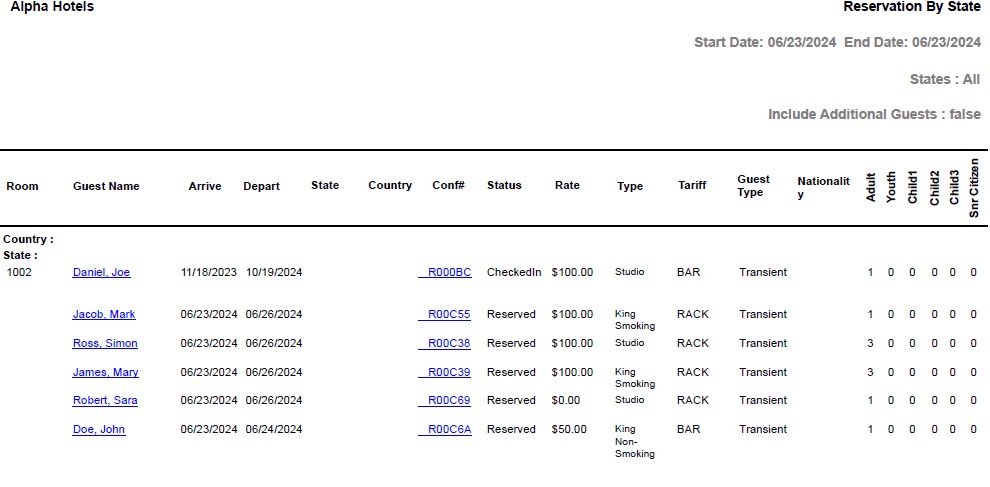
Report Fields
|
Field |
Description |
|---|---|
|
Room |
The room number assigned to the reservation. |
|
Guest Name |
The name of the guest will appear as a hyperlink and clicking it will navigate the user to the guest record. |
|
Arrive |
The guest arrival date. |
|
Depart |
The guest departure date. |
|
State |
The State to which the guest belongs. |
|
Country |
The Country to which the guest belongs. |
|
Conf# |
The confirmation number of the reservation will appear as a hyperlink and clicking it will navigate the user to the reservation record. |
|
Status |
The status of the reservation. |
|
Rate |
The room rate for the reservation. |
|
Type |
The room type assigned to the reservation. |
|
Tariff |
The tariff selected for the reservation. |
|
Guest Type |
The guest type selected for the guest in the reservation. |
|
Age Categories |
The number of guests in the reservation from each age category configured by the property. |