Reservations on the Books
Report parameters
|
Field |
Description |
|---|---|
|
Report Name |
The name of the report. |
|
Building Codes |
A selection list consisting of all the building codes. All building records created in the Building Codes (Settings à Setup à Room à Building Codes) screen are displayed as options in the drop-down list. Users can select multiple or all the building codes from the list to be displayed in the report generated. |
|
Report Options |
Available options include the following:
|
|
Include Revenue |
When enabled, the system includes revenue details in the report. |
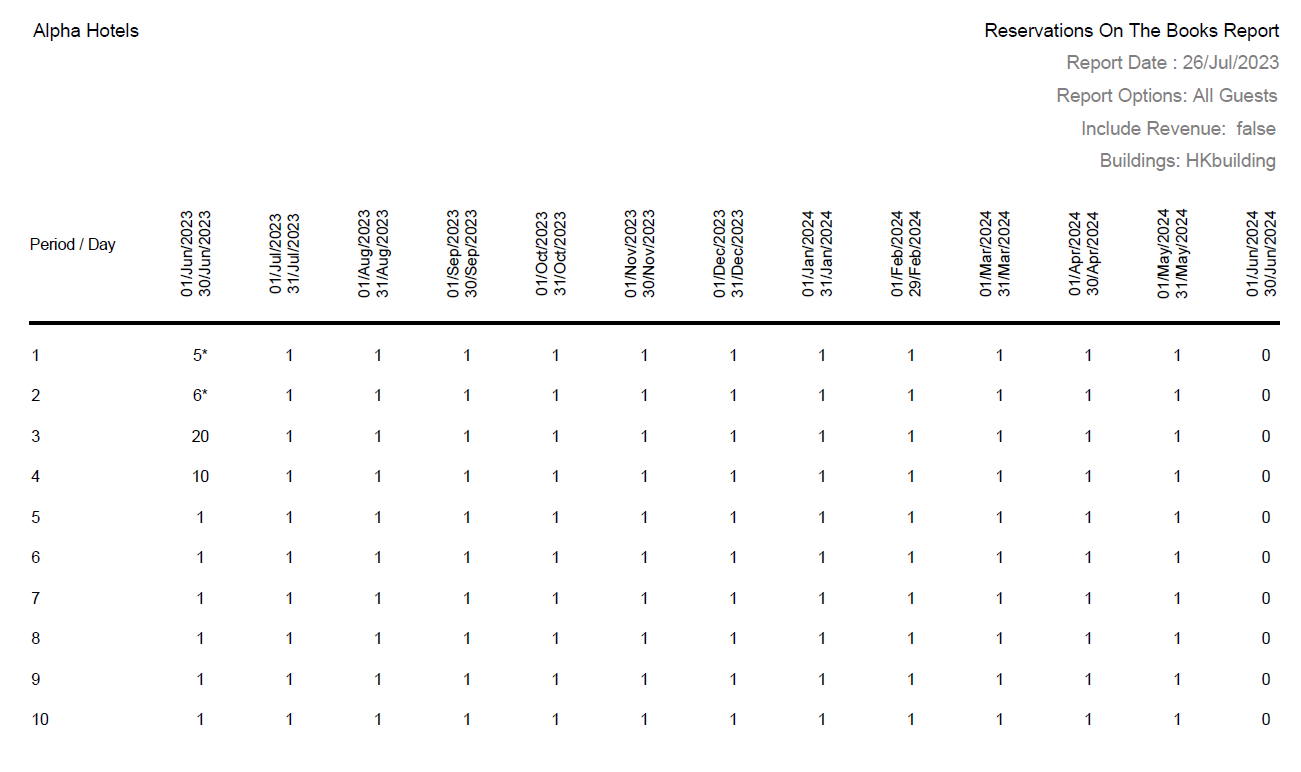
Sample Report
Report Fields
|
Field |
Description |
|---|---|
|
Period |
The period for which the reservations are created. |
|
Day |
Day wise breakup of reservations. |
|
Room Nights |
The total number of room nights reserved for each day and month. |
|
Occ% |
The percentage of the total number of occupied rooms. (Total Number of Occupied Rooms / Total Number of Rooms) × 100 |
|
Prev Year Room Nights |
The total number of room nights booked in the previous year. |
|
Curr Year- Prev Year |
The difference between the current year room nights and prev year room nights fields is displayed for each month. |
|
Prev Year Occ% |
Percentage of occupied rooms in the previous year. |
|
Curr Occ%-Prev Occ% |
The difference between the occupancy percentages of previous year and current year is displayed. |
|
Note: Report considers Sold Rates against the rooms |
|