Revenue by Destination
Report Parameters
|
Field |
Description |
|---|---|
|
Report Name |
The name of the report. |
|
Start Date |
The start date from when the data must be considered for generating the report. |
|
End Date |
The end date until when the data must be considered for generating the report. |
|
Provider Code |
A drop-down list consisting of all the transportation provider codes. Users can select multiple or all the provider codes from the list to be displayed in the report generated. |
|
Destination Code |
A drop-down list consisting of all the destination codes. Users can select multiple or all the destination codes from the list to be displayed in the report generated. |
Sample Report
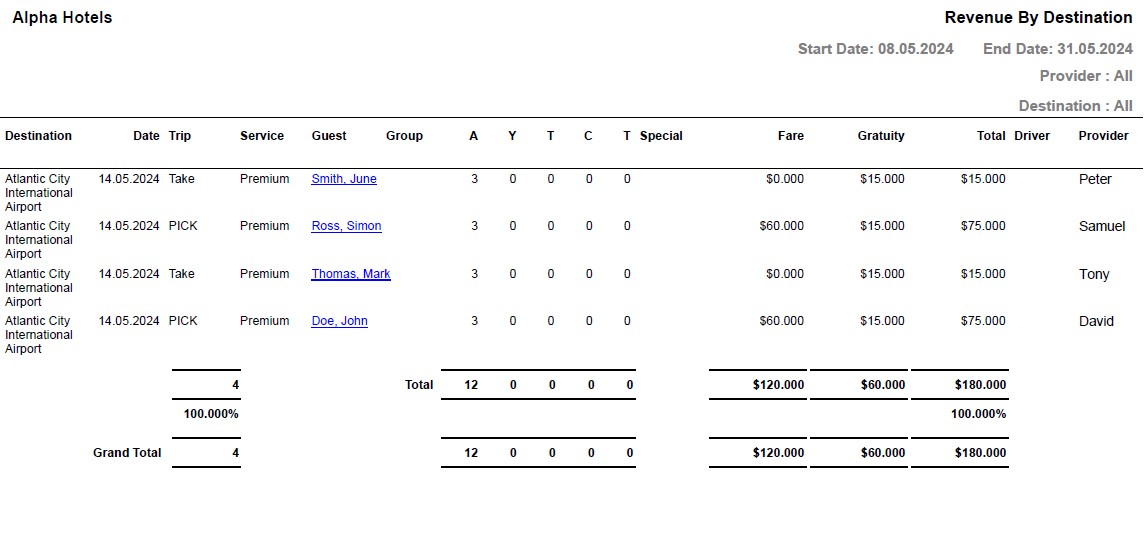
Report Fields
|
Field |
Description |
|---|---|
|
Destination |
The destination location. |
|
Date |
The date for which the booking has been made. |
|
Trip |
The type of trip. The type includes the following:
|
|
Service |
The type of vehicle used for the service. |
|
Guest |
The last name and first name of the guest will appear as a hyperlink and clicking it will navigate the user to the guest record. |
|
Group |
In case of group reservations, the booking name of the group is displayed here. |
|
Adult |
The number of adults on the reservation. |
|
Youth |
The number of youths on the reservation. |
|
Child |
The number of children on the reservation. |
|
Toddlers |
The number of toddlers on the reservation. |
|
Fare |
The amount charged for the trip. |
|
Gratuity |
The amount of gratuity. |
|
Total |
The sum of fare and gratuity. |
|
Driver |
The name of the driver assigned to the trip. |