Revenue
Department Revenue
Report Parameters
|
Field |
Description |
|---|---|
|
Report Name |
The name of the report. |
|
Report Date |
The date for which the report must be generated. |
|
Users |
A drop-down list consisting of all the users. Users can select multiple or all the users from the list to be displayed in the report generated. |
|
Building Codes |
A drop-down list consisting of all the building codes. All building records created in the Building Codes (Settings à Setup à Room à Building Codes) screen are displayed as options in the drop-down list. Users can select multiple or all the building codes from the list to be displayed in the report generated. |
|
Group By Building |
By default, this flag will be disabled. |
|
Include All Posttype |
By default, this flag will be disabled. |
|
Include Payment Method Breakdown |
By default, this flag will be disabled. |
Sample Report
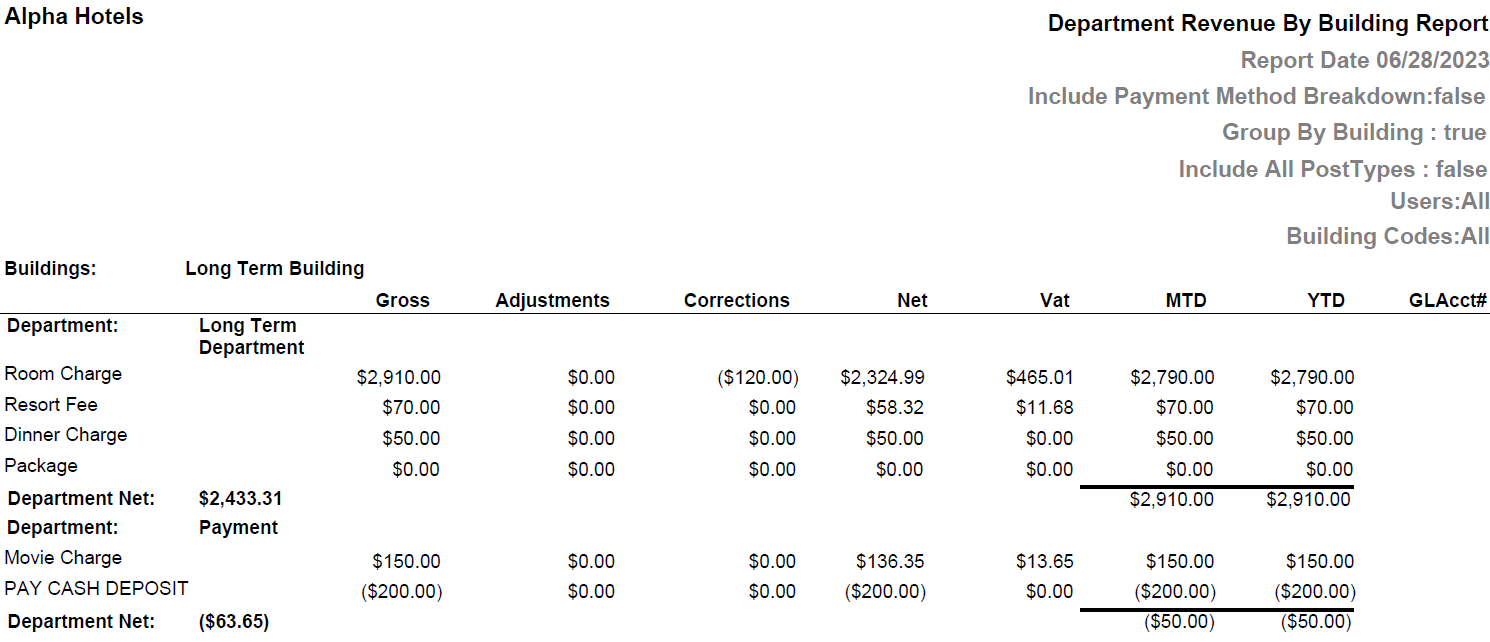
Report Fields
|
Field |
Description |
|---|---|
|
Buildings |
Displays the building code. This field will appear only if the Group By Building is enabled. |
|
Department |
Displays the department code. |
|
Gross |
The gross (debits and credits) revenue for the day. |
|
Adjustments |
Sum of all adjustments credited against the revenue types/taxes/tips for the day. |
|
Corrections |
Sum of all corrections debited/credited against the revenue types/taxes/tips for the day. |
|
Net |
Sum of debits and credits. |
|
VAT |
Displays the VAT amount applied for postings under each department. This column will appear only if the property is VAT-enabled. |
|
For All Users |
|
|
MTD |
Shows the sum of net balances (charges – adjustments) posted under revenue categories from start of the month to current date. |
|
YTD |
Shows the sum of net balances (charges – adjustments) posted under revenue categories from start of the year to current date. |
|
GLAcct# |
GL account that the transaction type is associated with. |
|
Department Net |
Sum of credits and debits for each department for the report date. |
|
Note: Report considers Posted Rates against the rooms |
|