Room Income
Report Parameters
|
Field |
Description |
|---|---|
|
Report Name |
The name of the report. |
|
From Date |
The start date from when the data must be considered to generate the report. |
|
To Date |
The end date until when the data must be considered to generate the report. |
|
Sort options |
Available options include the following:
|
|
Building codes |
A drop-down list consisting of all the building codes. All building records created in the Building Codes (Settings à Setup à Room à Building Codes) screen are displayed as options in the drop-down list. Users can select multiple or all the building codes from the list to be displayed in the report generated. |
|
Room type |
A drop-down list consisting of all the room types. Users can select multiple or all the room types from the list to be displayed in the report generated. |
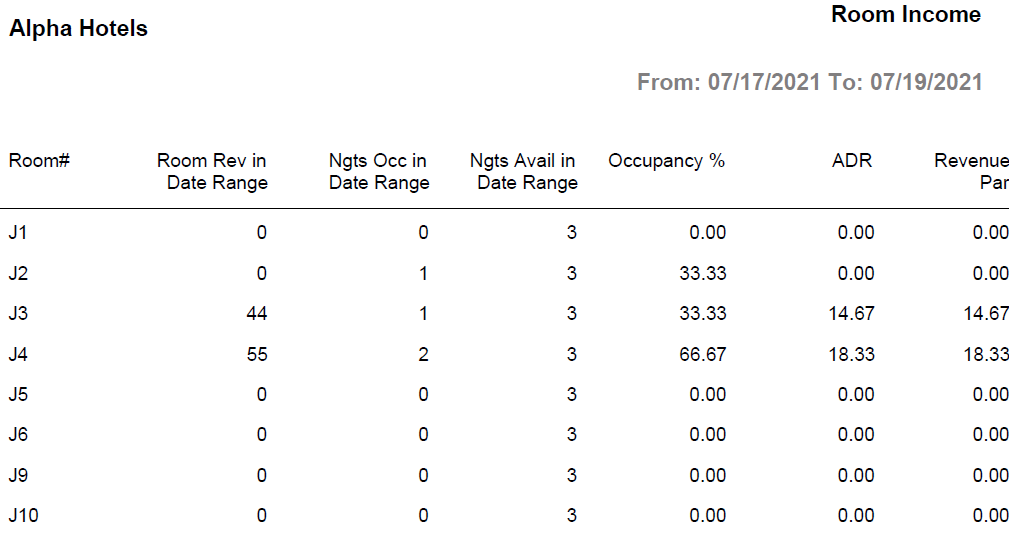
Sample Report
Report Fields
|
Field |
Description |
|---|---|
|
Room# |
The room number of the guest. |
|
Room Rev in Date Range |
The total revenue generated from room bookings in the date range selected in parameters. |
|
Ngts Occ in Date Range |
The number of nights booked in the date range selected in parameters. |
|
Ngts Avail in Date Range |
The value will always be 1 for all rooms. |
|
Occupancy % |
The percentage of the total number of occupied rooms. (Total Number of Occupied Rooms / Total Number of Rooms) × 100. |
|
ADR |
The system calculated average daily rate for the reservation. |
|
Revenue Par |
The revenue PAR available room is calculated as follows: Revenue PAR = Total Room Revenue divided by total number of rooms. |
|
Note: Report considers Posted Rates against the rooms |
|