Room Scan
Report parameters
|
Field |
Description |
|---|---|
|
Report Name |
The name of the report. |
|
Room Types |
A drop-down list consisting of all the room types for the report selection. |
|
Building |
A drop-down list consisting of all the building types for the report selection. |
|
Status |
A list of reservation status of the guests. |
|
Condition |
A list of room conditions for the report selection.
|
|
Sort By |
Available options include the following:
|
|
Filter Group |
Available options include the following:
|
|
Room Type Group |
A drop-down list consisting of all the room type groups. Users can select multiple or all the room type groups from the list to be displayed in the report generated. |
|
Features |
A drop-down list consisting of all the room features for the report selection. |
|
Locations |
A drop-down list consisting of all the room locations for the report selection. |
|
Features-Match All Selections |
When enabled, the system matches the features with all the selections. |
|
Location-Match All Selections |
When enabled, the system matches the location with all the selections. |
|
Include Non Bedded Rooms |
When enabled, the system includes the non-bedded rooms associated with the available room types. |
Sample Report
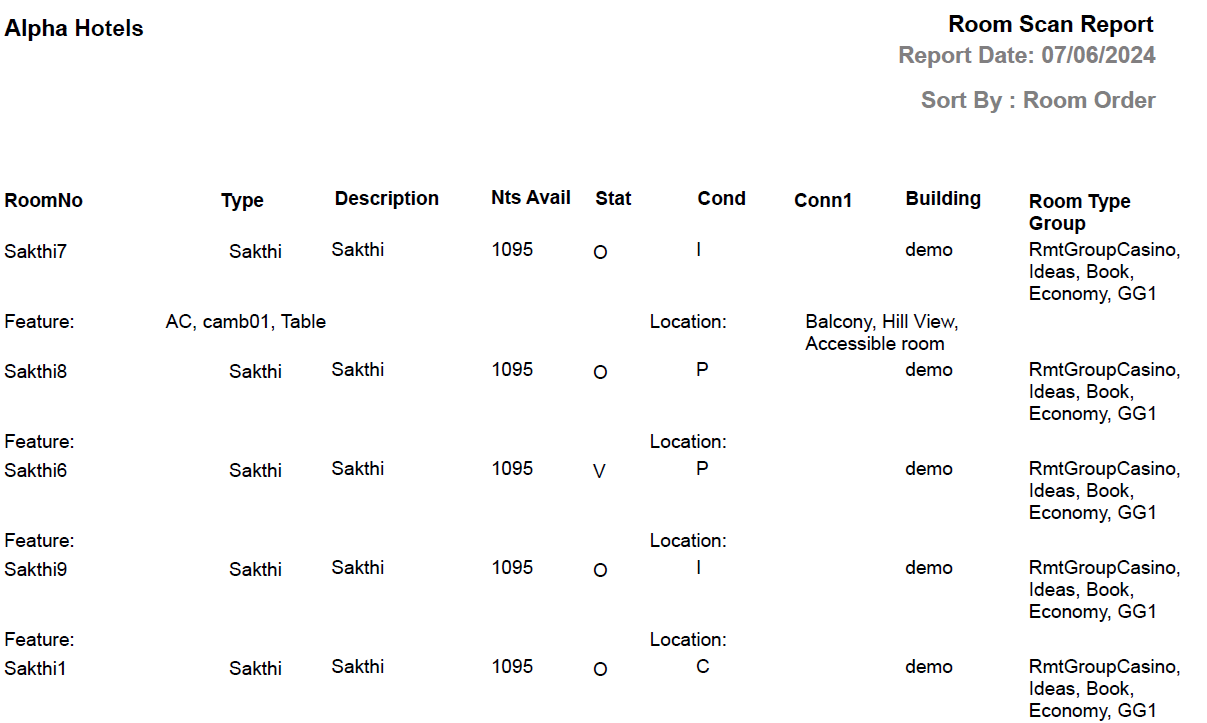
Report Fields
|
Field |
Description |
|---|---|
|
Room No |
The room number of the guest. |
|
Type |
The room type to which the room number belongs. |
|
Description |
The description of the room. |
|
Block |
Name of the block where the room is located. |
|
Stat |
The room status.
|
|
Cond |
Condition of the room.
|
|
Conn1 |
The room number of the connecting rooms, if any. |
|
Building |
Name of the building where the room is located. |
|
Room Type Group |
Name of the room type group associated with the room. This field will appear only when the Room Type Group option is selected as the filter. |