Rooms on the Books
Report parameters
|
Field |
Description |
|---|---|
|
Report Name |
The name of the report. |
|
From Date |
The start date from when the data must be considered for generating the report. |
|
To Date |
The end date until when the data must be considered for generating the report. |
|
Building Codes |
A selection list consisting of all the building codes. All building records created in the Building Codes (Settings à Setup à Room à Building Codes) screen are displayed as options in the drop-down list. Users can select multiple or all the building codes from the list to be displayed in the report generated. |
|
Consider Wholesaler as Transient |
When enabled, the room count and revenue from wholesaler bookings will be displayed in the report as follows:
When disabled, the room count and revenue from wholesaler bookings will be displayed in the report as follows:
By default, this flag will be disabled. |
|
Get Sold Rate/ Posted Revenue |
By default, this flag will be disabled. |
|
Include Non-Bedded Rooms |
By default, this flag will be disabled. |
Sample Report
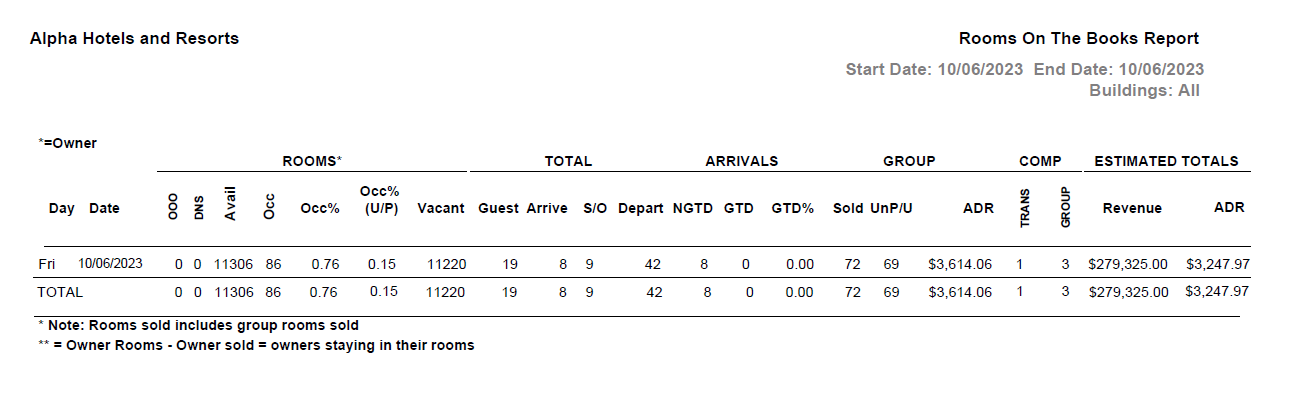
Report Fields
|
Field |
Description |
|---|---|
|
Day |
Day of the week in the given date range. |
|
Date |
Date from the given date range. |
|
ROOMS |
|
|
OOO |
Number of rooms with out of order status. |
|
DNS |
Number of rooms with do not sell status. |
|
Avail |
Number of available rooms. |
|
Occ |
Number of occupied rooms. |
|
Occ% |
Percentage of occupied rooms. |
|
Occ% (U/P) |
Percentage of picked up rooms. |
|
Vacant |
Number of vacant rooms. |
|
TOTAL |
|
|
Guest |
Number of guests scheduled to arrive in the given date. |
|
Arrive |
Number of guests arrived the reservation. |
|
S/O |
Number of sold out rooms. |
|
Depart |
Number of guests scheduled to depart in the given date. |
|
ARRIVALS |
|
|
NGTD |
Number of non-guaranteed reservations for the given date. |
|
GTD |
Number of guaranteed reservations for the given date. |
|
GTD % |
Percentage of guaranteed reservations for the given date. |
|
GROUP |
|
|
Sold |
Number of sold group rooms. |
|
UnP/U |
Number of group rooms that are not picked up. |
|
ADR |
The system calculated average daily rate. |
|
Comp |
|
|
Trans |
The number of transient complimentary rooms in the bookings. |
|
Group |
The number of group complimentary rooms in the bookings. |
|
EST TOTALS |
|
|
Revenue |
The estimated total revenue generated through all the rooms for the given date. |
|
ADR |
The system calculated average daily rate of all the rooms for the given date. |
|
Note: Report considers Sold Rates against the rooms |
|