Rooms
Out of Order Rooms
Report Parameters
|
Field |
Description |
|---|---|
|
Report Name |
The name of the report. |
|
Start Date |
The start date from when the data must be considered for generating the report. |
|
End Date |
The end date until when the data must be considered for generating the report. |
|
Building Codes |
A drop-down list consisting of all the building codes. All building records created in the Building Codes (Settings à Setup à Room à Building Codes) screen are displayed as options in the drop-down list. Users can select multiple or all the building codes from the list to be displayed in the report generated. |
|
Sort Options |
Available options include the following:
|
|
Out Of Order Types |
A drop-down list consisting of all the out of order types. Users can select multiple or all the types from the list to be displayed in the report generated. |
Sample Report
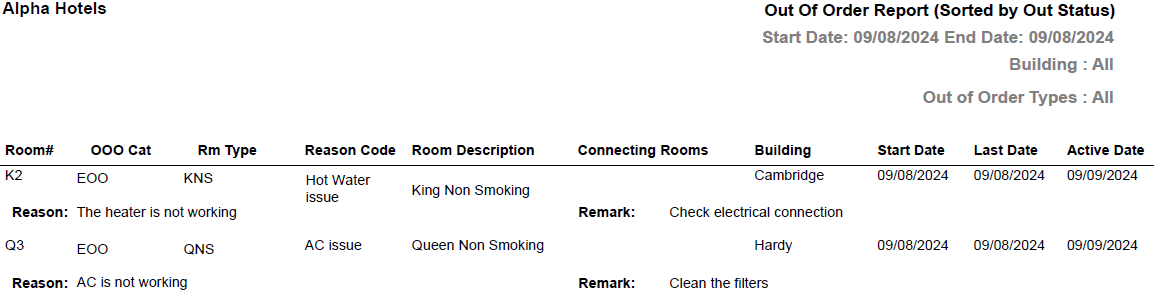
Report Fields
|
Field |
Description |
|---|---|
|
Room # |
The room number of the guest. |
|
OOO Cat |
The category to which the room belongs. It can be:
|
|
Rm Type |
The room type to which the room number belongs. |
|
Reason Code |
The reason code selected for the out of order room. |
|
Room Description |
The description of the room. |
|
Connecting Rooms |
The room number of the associated connecting rooms, if any. |
|
Building |
The building associated with the room. |
|
Start Date |
The date starting from when the room will be in the out of order status. |
|
Last Date |
The date until when the room will remain in the out of order status. |
|
Active Date |
The date starting from when the room will be set to the Active status. |
|
Reason |
The reason because of which the room is in out of order category. |
|
Remarks |
The comments added for the out of order room. |
|
Total Rooms |
The total number of out of order rooms. |