Sales Mix
Report Parameters
|
Field |
Description |
|---|---|
|
Report Name |
The name of the report. |
|
Start Date |
The start date from when the data must be considered for generating the report. |
|
End Date |
The end date until when the data must be considered for generating the report. |
|
Outlet(s) |
The default outlet is displayed by default. Only outlets with user access are displayed in the drop-down list. Users can select the preferred outlet to generate the report. |
|
User(s) |
Select preferred user(s) from the drop-down list. |
|
Include Inactive Users |
When enabled, the system includes inactive users in the report. |
Sample Report
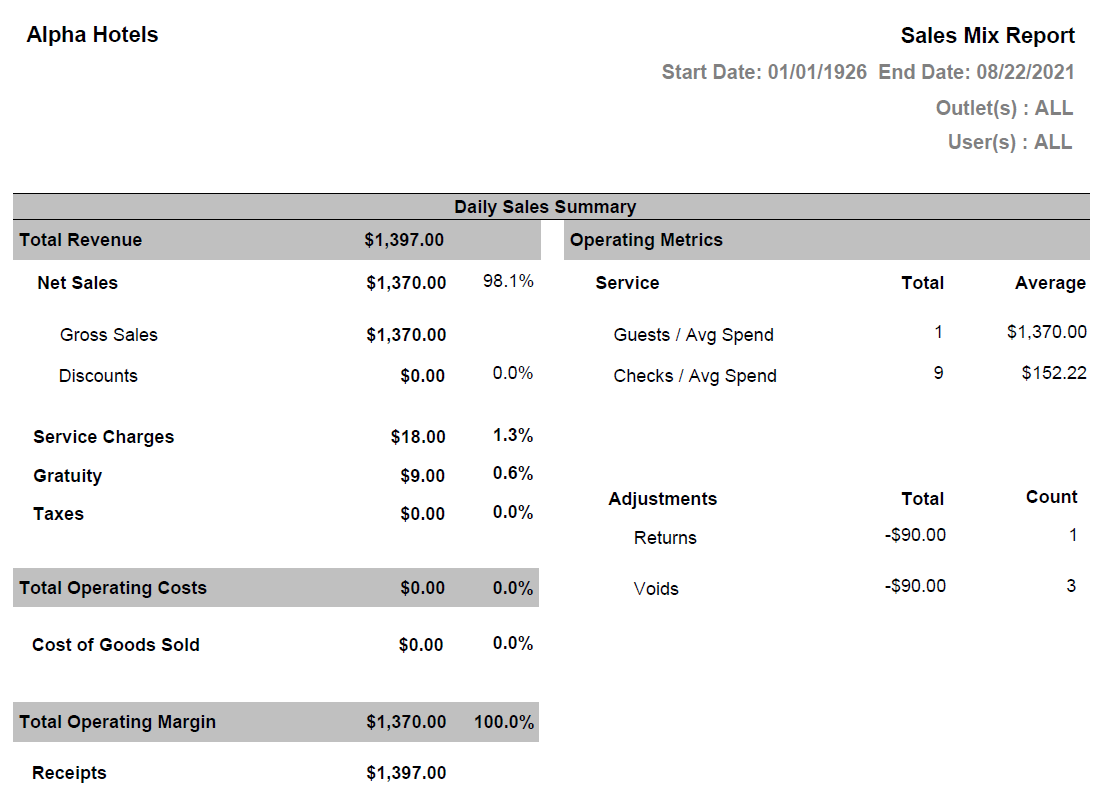
Report Fields
|
Field |
Description |
|---|---|
|
Total Revenue |
The overall revenue from all the selected outlets that includes net sales amount, service charges, gratuity, and taxes. |
|
Net Sales |
Net Sales = Sales Amount - Discount on all Retail Items (for selected outlets). The Percentage of net sales is calculated based on the total revenue. |
|
Gross Sales |
The sales amount of all the retail items purchased for the selected outlets including discount. |
|
Discounts |
The total amount of discount applied on all the retail items purchased. The percentage of discount is calculated based on the total net sales and is displayed as a negative (-) value. |
|
Service Charges |
The total amount of service charges applied on all the retail items purchased. The percentage of service charge is displayed based on the total revenue. |
|
Gratuity |
The total amount of gratuity applied on all the retail items purchased. The percentage of gratuity is displayed based on the total revenue. |
|
Taxes |
The total amount of tax applied on all the retail items purchased. The percentage of tax is displayed based on the total revenue. |
|
Total Operating Cost |
The total amount of all the retail items sold in the selected outlet. If a value is displayed in this field, the percentage will be displayed as 100.0% else it will be 0.0% |
|
Cost of Goods Sold |
The amount of the items sold. This amount will be same as the total operating cost. The percentage is calculated based on the total operating cost. |
|
Total Operating Margin |
The total amount of net sales and taxes. The percentage is always displayed as 100%. |
|
Receipts |
The total amount from all the configured payment methods for the selected outlets. |
|
Operating Metrics |
|
|
Service |
|
|
Guests/Avg Spend |
Transactions relating to Return Without Ticket will not be included. The count will be deducted if the transaction is voided. |
|
Checks/Avg Spend |
Tickets generated for Return Without Ticket will not be included. The count will be deducted if the transaction is voided. |
|
Adjustments |
|
|
Returns |
|
|
Voids |
|