Shift Drop Log
Report Parameters
|
Field |
Description |
|---|---|
|
Report Name |
The name of the report. |
|
Start Date |
The start date from when the data must be considered for generating the report. |
|
End Date |
The end date until when the data must be considered for generating the report. |
|
Sort Options |
The criteria by which the data in the report must be sorted. Available options include the following:
|
|
Report Options |
The data that must be included in the report. Available options include the following:
|
|
Category |
A drop-down list consisting of all department categories for report selection. The records created in the Category (Settings à Setup à General à Category) screen are displayed as options in the drop-down list. Users can select multiple or all the categories. |
|
Manager |
A drop-down list consisting of all managers for report selection. Users can select multiple or all the available managers. |
Sample Report
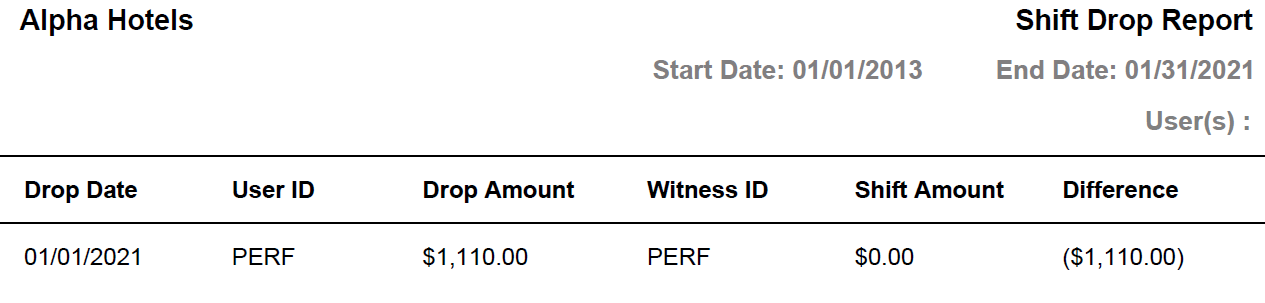
Report Fields
|
Field |
Description |
|---|---|
|
Drop Date |
The date the user logs the amount of cash issued at the beginning of the shift. |
|
User ID |
The ID of the user who performed the shift drop. |
|
Drop Amount |
The cash balance available at the beginning of the shift. |
|
Witness ID |
The ID of the user who witnessed the shift drop. |
|
Shift Amount |
The total amount collected by the user during the shift. |
|
Difference |
The difference between the drop amount and the shift amount. |