Shift
Report Parameters
|
Field |
Description |
|---|---|
|
Report Name |
The name of the report. |
|
Start Date |
The start date from when the data must be considered for generating the report. |
|
End Date |
The end date until when the data must be considered for generating the report. |
|
Start Time |
The time from when the transactions must be recorded to generate the report. |
|
End Time |
The time until when the transactions must be recorded to generate the report. |
|
Outlet(s) |
The default outlet is displayed by default. Only outlets with user access are displayed in the drop-down list. Users can select the preferred outlet to generate the report. |
|
User(s) |
Select preferred user(s) from the drop-down list. |
|
Starting Cash ($) |
Enter the starting transaction amount to generate the report. |
|
Include Inactive Users |
When enabled, inactive users will be included in the report. |
|
Split By User |
By default, this flag will be disabled. |
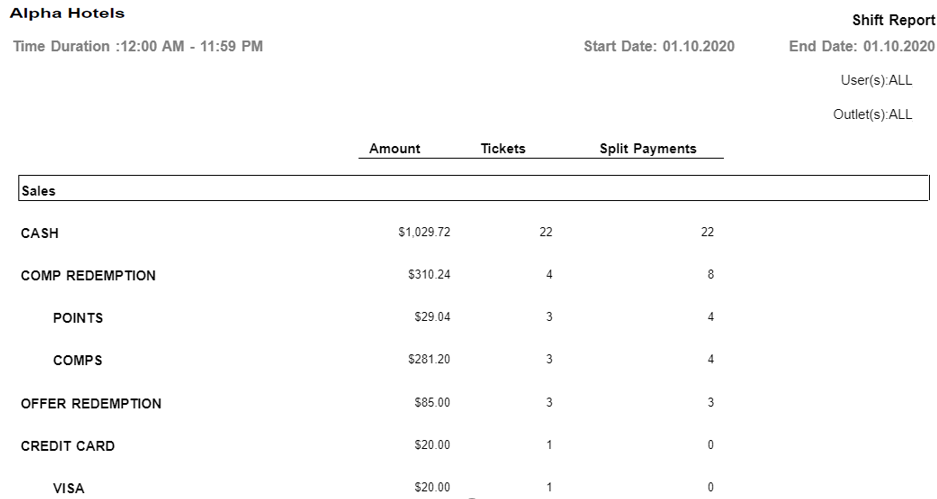
Sample Report
Report Fields
|
Field |
Description |
|---|---|
|
Amount |
The total amount to be tendered through each possible payment method. |
|
Tickets |
The count of all tickets of that transaction. |
|
Split Payments |
The total amount of multiple payment methods. |
|
Total |
The sum of all settlement methods. |
|
Grand Total |
The sum for all the outlets. |
|
Starting Cash |
The amount of cash entered by the user. |
|
Cash in Drawer |
The sum of the starting cash value and the total cash settlements value for the selected dates and/or outlets. |
|
Cash Drop |
The sum of total cash settlements for the selected dates and/or outlets. |
|
Sales |
The total sales recorded. |