Special Requests/Comments
Report parameters
|
Field |
Description |
|---|---|
|
Report Name |
The name of the report. |
|
Start Date |
The start date from when the data must be considered for generating the report. |
|
End Date |
The end date until when the data must be considered for generating the report. |
|
Report Options |
Available options include the following:
|
|
Special Requirements |
A list of special requests/comments by the guest. |
|
Print all stays with comments |
When enabled, the system prints all the reservations that have special requests/comments. |
|
Building Codes |
A drop-down list consisting of all the building codes. All building records created in the Building Codes (Settings à Setup à Room à Building Codes) screen are displayed as options in the drop-down list. Users can select multiple or all the building codes from the list to be displayed in the report generated. By default, the All option will be selected. |
Sample Report
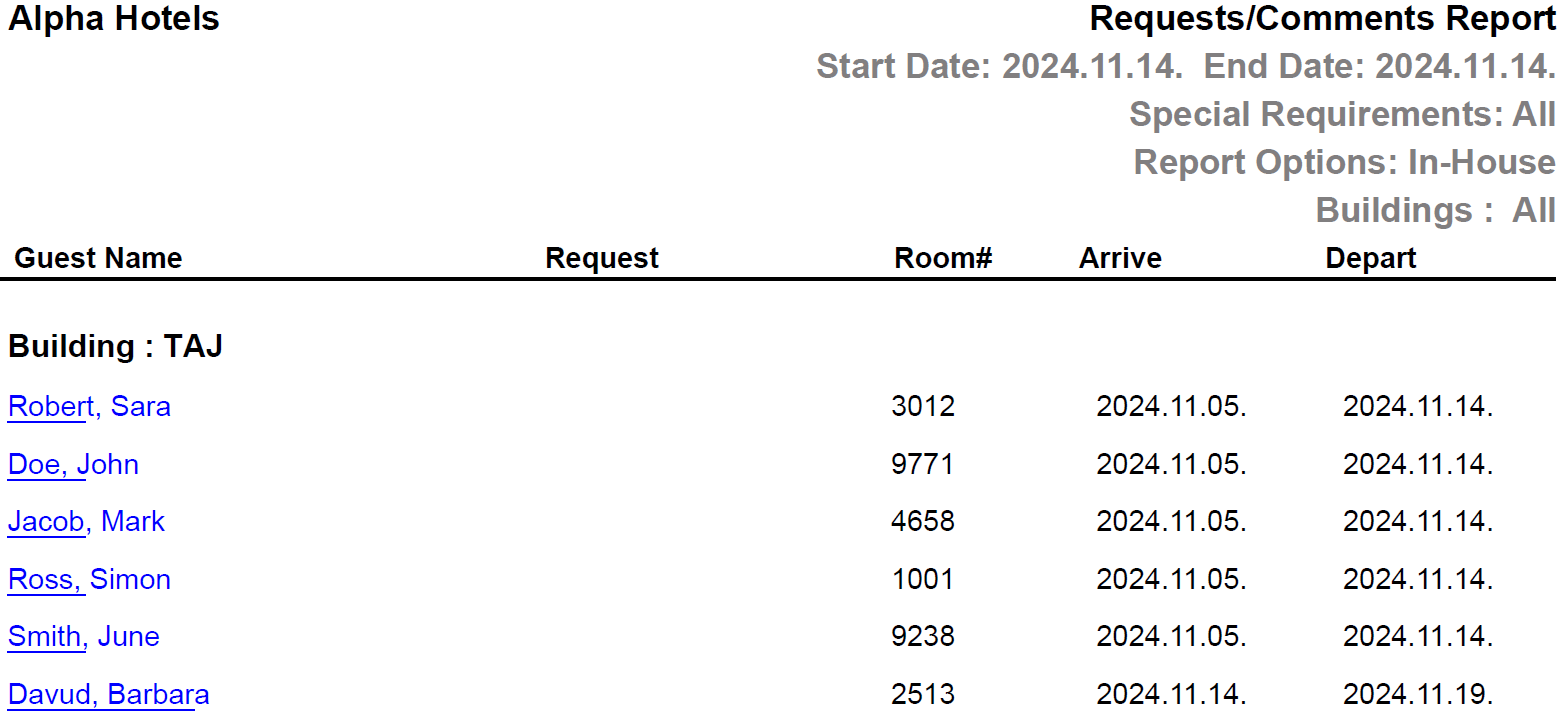
Report Fields
|
Field |
Description |
|---|---|
|
Guest Name |
The first name and the last name of the guest will appear as a hyperlink and clicking it will navigate the user to the guest record. |
|
Request |
The special request posted by the guest. |
|
Room # |
The room number of the guest. |
|
Arrive |
The date of arrival of the guest. |
|
Depart |
The date of departure of the guest. |
|
Building |
The name of the building. |