Staff Member Summary Report
Report Parameters
|
Field |
Description |
|---|---|
|
Report Name |
The name of the report. |
|
Start Date |
The start date from when the data must be considered for generating the report. |
|
End Date |
The end date until when the data must be considered for generating the report. |
|
Include Inactive Users |
When enabled, the system includes inactive users in the users drop-down list. |
|
Users |
A list of all available users for report selection. |
|
Hide Corrected Values |
By default, this flag will be disabled. |
|
Include Zero Comm, SC, Gratuity |
Enabling this flag would include details of commission, service charge and gratuity in the report. |
|
Page Break |
When enabled, the system adds page breaks in the report. |
Sample Report
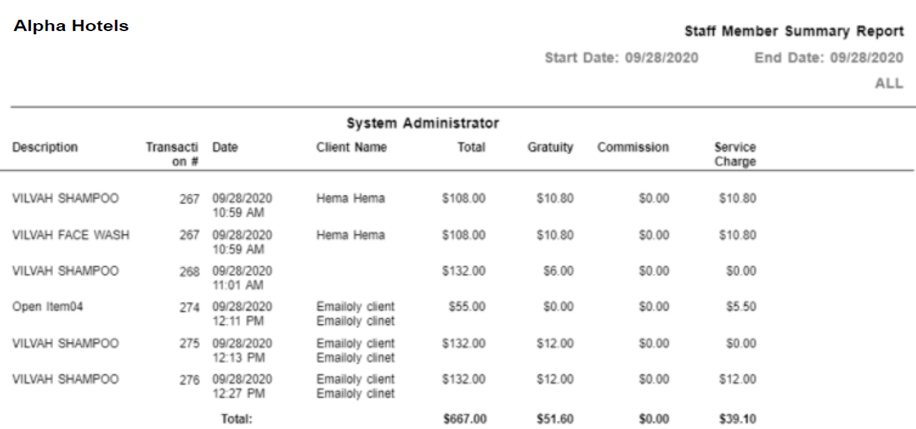
Report Fields
|
Field |
Description |
|---|---|
|
Description |
The description of the retail item. |
|
Transaction # |
The transaction number of the retail transaction. |
|
Date |
The date of the transaction. |
|
Client Name |
The name of the client associated with the transaction. |
|
Total |
The total amount of transaction. |
|
Gratuity |
The gratuity for the retail item. |
|
Service Charge |
The service charge for the retail item. |
|
Commission |
The commission total for the item. |
|
VAT Enabled |
|
|
Service Charge Net |
The service charge calculated against the net amount. |
|
Service Charge Gross |
The service charge calculated against the gross amount. |
|
Service Charge VAT |
The service charge calculated against the VAT amount. |