Stay Over
Report parameters
|
Field |
Description |
|---|---|
|
Report Name |
The name of the report. |
|
Report Date |
The date for which the report must be generated. |
|
Building Codes |
A drop-down list consisting of all the building codes. All building records created in the Building Codes (Settings à Setup à Room à Building Codes) screen are displayed as options in the drop-down list. Users can select multiple or all the building codes from the list to be displayed in the report generated. |
|
Sort Options |
Available options include the following:
|
|
Include Non-Bedded Rooms |
When enabled, the system includes non-bedded rooms associated with the available room types in the report. |
|
Include Group Masters |
When enabled, the system includes group masters in the stay over report. |
|
Group By Building |
When enabled, the system groups all the stay over details in each building type. |
Sample Report
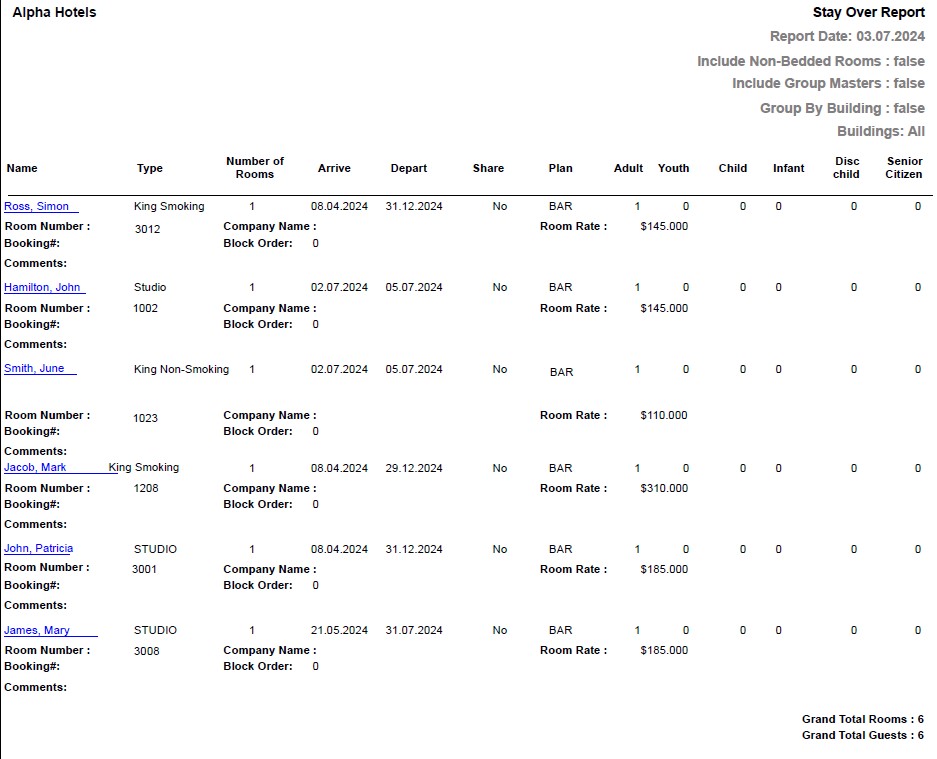
Report Fields
|
Field |
Description |
|---|---|
|
Name |
The first name and the last name of the guest will appear as a hyperlink and clicking it will navigate the user to the guest record. |
|
Type |
The room type is displayed. |
|
Number of Rooms |
Number of rooms associated with the guest reservation. |
|
Arrive |
The date of arrival of the guest. |
|
Depart |
The date of departure of the guest. |
|
Share |
Indicates whether the reservation is a shared reservation or not. |
|
Plan |
The rate plan for the reservation. |
|
Adult |
Number of adults on the reservation. |
|
Youth |
Number of youths on the reservation. |
|
Child |
Number of children on the reservation. |
|
Teen |
Number of teens on the reservation. |
|
Senior Citizen |
Number of senior citizens on the reservation. |
|
Comments |
Comments entered by the user, if any. |
|
Room Number |
The room number of the guest. |
|
Company Name |
The name of the company to which the guest belongs. |
|
Room Rate |
The room rate for the stay. |