Summary Cancellations Report
Report parameters
|
Field |
Description |
|---|---|
|
Report Name |
The name of the report. |
|
Start Date |
The start date from when the data must be considered for generating the report. |
|
End Date |
The end date until when the data must be considered for generating the report. |
|
Building Codes |
A drop-down list consisting of all the building codes. All building records created in the Building Codes (Settings à Setup à Room à Building Codes) screen are displayed as options in the drop-down list. Users can select multiple or all the building codes from the list to be displayed in the report generated. |
|
Date Options |
Available options include the following:
|
|
Sort By Building |
When enabled, the system sorts the records by building codes. |
Sample Report
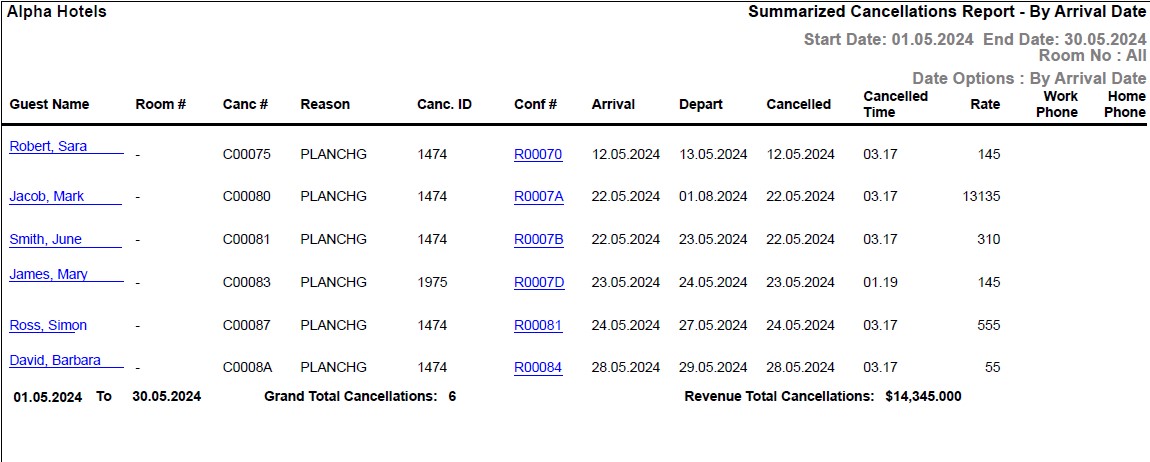
Report Fields
|
Field |
Description |
|---|---|
|
Guest Name |
The first name and the last name of the guest will appear as a hyperlink and clicking it will navigate the user to the guest record. |
|
Room # |
The room number of the guest. |
|
Canc # |
The reservation cancellation number. |
|
Reason |
The reason for cancelling the room is displayed. |
|
Canc. ID |
User ID of the user who cancelled the guest reservation. |
|
Conf # |
The confirmation number of the reservation will appear as a hyperlink and clicking it will navigate the user to the reservation record. |
|
Arrival |
The date of arrival of the guest. |
|
Depart |
The date of departure of the guest. |
|
Cancelled |
The date on which the room was cancelled. |
|
Cancelled Time |
The time when the reservation was cancelled. |
|
Rate |
The rate defined for the room. |
|
Work Phone |
The work phone number of the guest. |
|
Home Phone |
The home phone number of the guest. |
|
Cancellations for |
Number of guest cancellations occurred on the given date. |
|
Revenue for |
The revenue amount generated through cancellations on the given date. |