Turndown Sections Report
Report Parameters
|
Field |
Description |
|---|---|
|
Report Name |
The name of the report. |
|
Report Date |
The date for which the data must be considered for generating the report. |
|
Building Codes |
A drop-down list consisting of all the building codes. All building records created in the Building Codes (Settings à Setup à Room à Building Codes) screen are displayed as options in the drop-down list. Users can select multiple or all the building codes from the list to be displayed in the report generated. |
|
Print Names |
When enabled, the guest’s name is printed on the generated report. |
|
Sort Options |
The criteria by which the data in the report must be sorted. Available options include the following:
|
|
# of Attendants |
Select the number of attendants from the spinner. The default value is 1. |
Sample Report
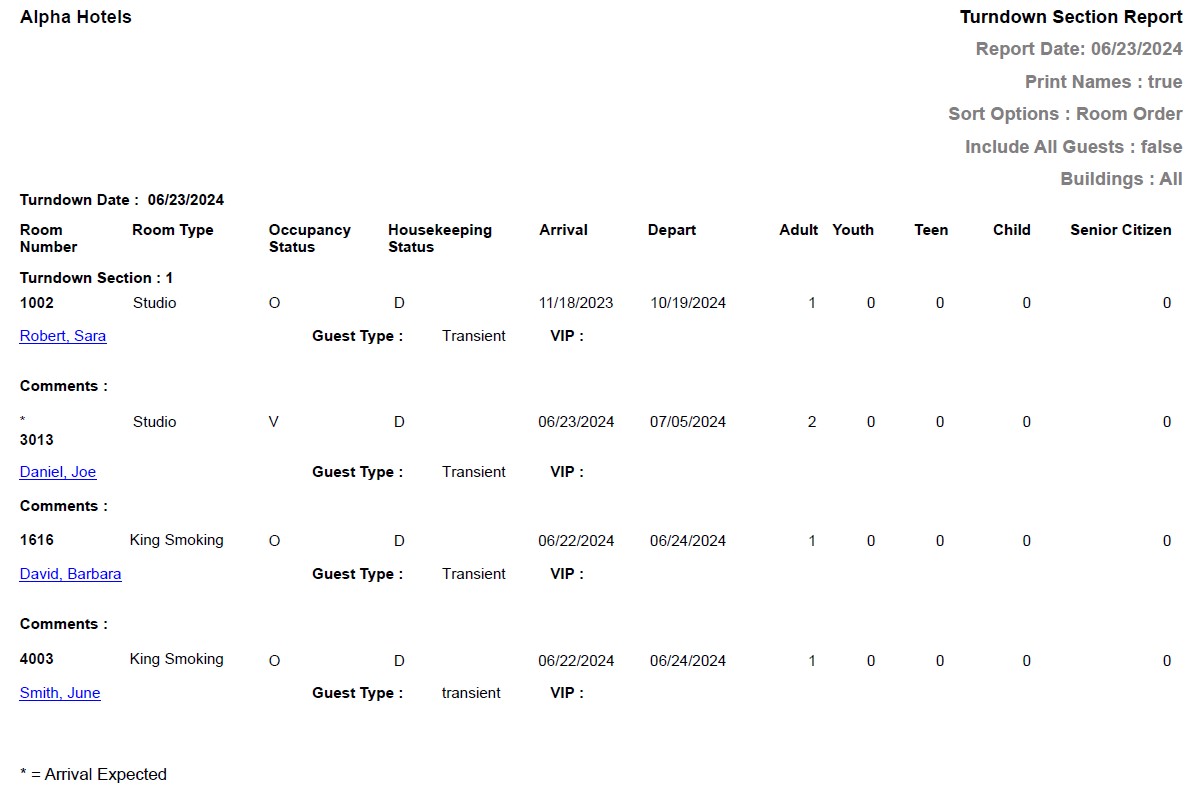
Report Fields
|
Field |
Description |
|---|---|
|
Turndown Date |
The date on which the housekeeping staff completed the turndown service. |
|
Room Number |
The room number of the guest. |
|
Room Type |
The room type to which the room number belongs. |
|
Occupancy Status |
The occupancy status of the room.
|
|
HouseKeeping status |
The housekeeping status of the room.
|
|
Arrival |
The date of arrival of the guest. |
|
Depart |
The date of departure of the guest. |
|
Adult |
Number of adults on the reservation. |
|
Youth |
Number of youths on the reservation. |
|
Teen |
Number of teens on the reservation. |
|
Child |
Number of children on the reservation. |
|
Senior Citizen |
Number of senior citizens on the reservation. |
|
Guest Name |
The first name and last name of the guest will appear as a hyperlink and clicking it will navigate the user to the guest record. |
|
Guest Type |
The guest type selected when creating the reservation. |
|
VIP |
The code that identifies the VIP type of the guest at the property. |
|
Comments |
The comments entered by the user, if any. |