Weekly Forecast Report
Report Parameters
|
Field |
Description |
|---|---|
|
Report Name |
The name of the report. |
|
Report Date |
The date for which the data must be considered to generate the report. |
|
Building Codes |
A drop-down list consisting of all the building codes. All building records created in the Building Codes (Settings à Setup à Room à Building Codes) screen are displayed as options in the drop-down list. Users can select multiple or all the building codes from the list to be displayed in the report generated. |
|
Report Options |
Available options include the following:
|
Sample Report
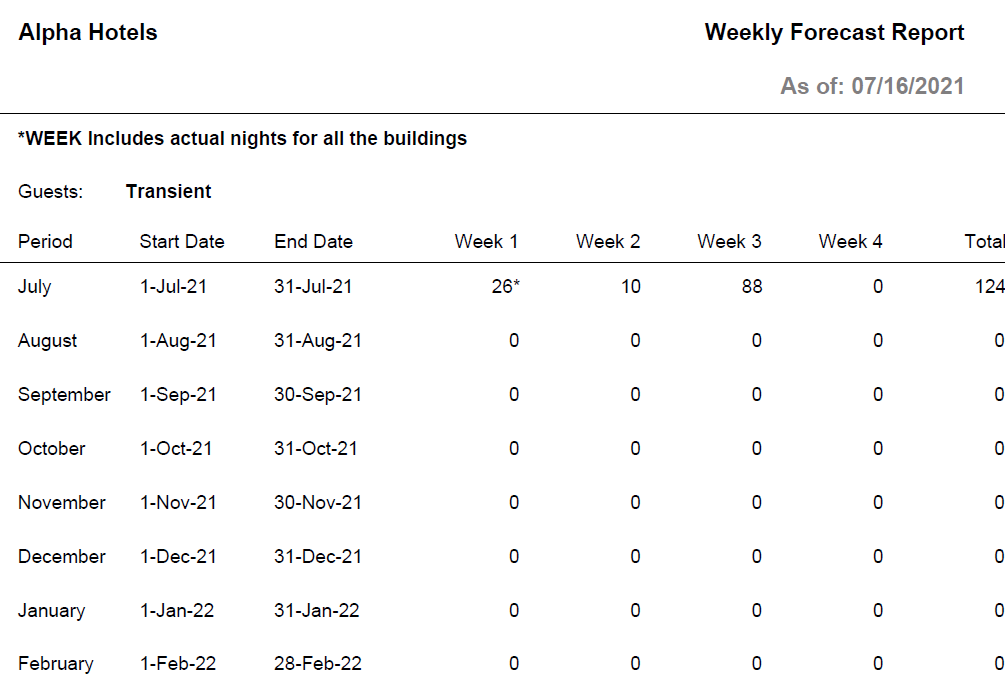
Report Fields
|
Field |
Description |
|---|---|
|
Guests |
The guest type selected in parameters. |
|
Period |
Months of the year. |
|
Start Date |
The start date of the period. |
|
End Date |
The end date of the period. |
|
Week 1 |
Number of room reservations in the first week. |
|
Week 2 |
Number of room reservations in the second week. |
|
Week 3 |
Number of room reservations in the third week. |
|
Week 4 |
Number of room reservations in the fourth week. |
|
Total |
The total number of room reservations made during a period. |