Checking House Status
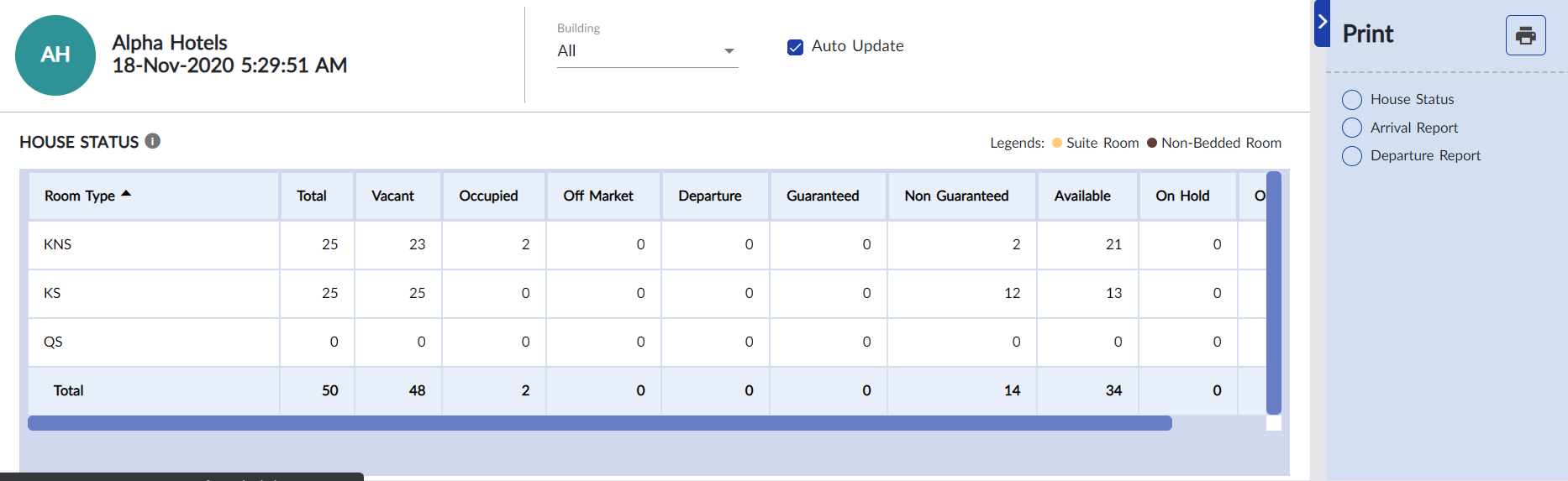
The House Status menu allows the front desk user to view and print the overall and building wise statuses of the property. Users can also generate the arrival and departure reports from this screen.
Breakpoint: 55010- House Status (Front Office - Front Desk)
Navigate to Front Desk à House Status.
Select one or more buildings from the Building drop-down list to filter the results displayed in the grid.
Enable the Auto Update flag to auto update the grid.
The grid displays the following information:
|
Field |
Description |
|---|---|
|
Room Type |
The room types available in the selected buildings. |
|
Total |
The total number of rooms available in each room type. |
|
Vacant |
The number of vacant rooms available. |
|
Occupied |
The number of rooms that are occupied. |
|
Off Market |
The number of rooms that are in Out of order condition. |
|
Departure |
The number of rooms for which the guest departures are pending. |
|
Guaranteed |
The number of reservations made with credit card information. |
|
Non-Guaranteed |
The number of reservations made without credit card information. |
|
Available |
The number of rooms that are available. It is the difference between the sum of vacant and departure values and the sum of guaranteed and Non-guaranteed reservations. That is, ((Vacant + Departures) - (Guaranteed + Non-Guaranteed)). |
Users can select the House Status, Arrival Report, or Departure Report options and click Print icon to generate the respective report.